


Disable Eco Coaching?


Thread Starter
|
Member
Joined: Jul 2014
Posts: 269
From: Falls Church, VA
Disable Eco Coaching?
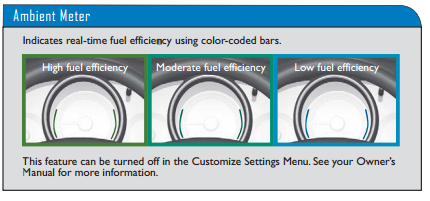
Is there a way to disable the green bars that appear on the side of the speedometer? I like how all the gauges are blue, so the one green flashing color is just distracting. I don't need a blue light to tell me that I am pressing the accelerator.
The owner's manuals on honda.com offer clues but no solutions. The 2015 Technology Reference Guide (EX/EX-L) on page seven says "This feature can be turned off in the Customize Settings Menu. See your Owner’s
Manual for more information."
The owner's manual mentions the Eco Assist "Ambient Meter" only once, on page nine, and there is no mention of settings to disable this feature. There is no "Customize Settings Menu", at least on the EX-L. The Civic, Accord and CRV all have settings to turn off the Eco Assist Ambient meter but I searched through my EX-L's HondaLink settings and could not find the setting anywhere.
Anybody know? Can somebody with an LX check if there is a display setting to disable "fuel efficiency backlight" (the name of the setting in a Civic)?
Also the eco coaching ambient meter turns green even when using the brakes, albiet gently. USING THE BRAKES IS NOT FUEL EFFICIENT!
The owner's manuals on honda.com offer clues but no solutions. The 2015 Technology Reference Guide (EX/EX-L) on page seven says "This feature can be turned off in the Customize Settings Menu. See your Owner’s
Manual for more information."
The owner's manual mentions the Eco Assist "Ambient Meter" only once, on page nine, and there is no mention of settings to disable this feature. There is no "Customize Settings Menu", at least on the EX-L. The Civic, Accord and CRV all have settings to turn off the Eco Assist Ambient meter but I searched through my EX-L's HondaLink settings and could not find the setting anywhere.
Anybody know? Can somebody with an LX check if there is a display setting to disable "fuel efficiency backlight" (the name of the setting in a Civic)?
Also the eco coaching ambient meter turns green even when using the brakes, albiet gently. USING THE BRAKES IS NOT FUEL EFFICIENT!
Last edited by simonx314; Jul 16, 2014 at 10:26 AM. Reason: added comment about green light while braking

Member
Joined: Feb 2014
Posts: 426
From: Dunedin, Florida
I cannot find an answer for you. Tried looking myself. Had this on my old Insight and turned it off, but not this one and I have the EX-L. Wonder if its on the EX-L Nav ? Just guessing
Last edited by SR45; Jul 18, 2014 at 04:27 PM.
Thread Starter
|
Member
Joined: Jul 2014
Posts: 269
From: Falls Church, VA
I've had my EX-L for four days now, and since my post two days ago I have completely reversed my opinion. I love the Eco Ambient Meter. I am learning to be very easy on the gas and I am getting 50 mpg in my rush hour commute where before I was only getting 40.
I still want to know how to turn it off though, out of principle, because I don't like not knowing where settings are especially when the documentation says there is a setting.
I still want to know how to turn it off though, out of principle, because I don't like not knowing where settings are especially when the documentation says there is a setting.

Member
Joined: Jun 2014
Posts: 135
From: Boston MA
I have Navi, and it's not an option to shut off that I can find in the menus. I drilled into every menu level to be sure.
I like it, so I guess that is a good thing! Makes you wonder why they say you can, but no one has figured out how to do it just yet.
I will confirm that you could shut if off in the Accord, though.
I like it, so I guess that is a good thing! Makes you wonder why they say you can, but no one has figured out how to do it just yet.
I will confirm that you could shut if off in the Accord, though.


Member
Joined: Jun 2014
Posts: 108
From: Dallas

Whaaa? I guess there's another button on there somewhere I'm not sure of. Or are you talking about the trip button?

Member

Joined: Sep 2008
Posts: 33
From: Ann Arbor, MI
Owner's Manual | 2015 Honda Fit | Honda Owners Site
Look at page 7 of the online Tech manual that I was referring to - it wouldn't let me add a screen-grab of it, sorry...
Hope that helps!

Member
Joined: Jun 2014
Posts: 95
From: Westchester, NY
Here's a link to the various online manuals, for whichever trim model you have, with or without Navigation:
Owner's Manual | 2015 Honda Fit | Honda Owners Site
Look at page 7 of the online Tech manual that I was referring to - it wouldn't let me add a screen-grab of it, sorry...
Hope that helps!
Owner's Manual | 2015 Honda Fit | Honda Owners Site
Look at page 7 of the online Tech manual that I was referring to - it wouldn't let me add a screen-grab of it, sorry...
Hope that helps!
Member
Joined: Jun 2014
Posts: 135
From: Boston MA
We are trying to figure out how, (or if you even can) to turn off the ambient light meter ("eco coaching") around the speedo that glows different colors based on how efficiently you're driving. The manual says you can do this in the customized setting, but it seems that you can't. (I had an Accord that had the ambient light meter, and you could shut it off.) Some find the changing light distracting, or just don't like it.
ETA:mikeygnyc beat me to it.
So if you can figure that out, you'll make a lot of people very pleased! I like the light, so I think I'm in the minority.
ETA:mikeygnyc beat me to it.
So if you can figure that out, you'll make a lot of people very pleased! I like the light, so I think I'm in the minority.
Last edited by xStitchx; Jul 18, 2014 at 10:33 PM.


Member
Joined: Jun 2014
Posts: 108
From: Dallas
So I just went out in my car trying to disable this in the settings, and found it nowhere. I could have sworn I found it somewhere when I first got my car.


Member
Joined: Aug 2014
Posts: 144
From: st louis
It is too bad Honda does not have a customer service person or tech person monitoring this site to help answer these types of questions. I had a 2012 Mustang and was on site similar to this and Ford had a person who monitored the comments and did provide help and contact info at times. I should get my 2015 FIT LX next week. Bill


Member
Joined: Aug 2008
Posts: 450
From: new friggin york

sorry, i did this a week ago, when i was playing with the settings. i had the manual, and followed it. if i had a car, i would walk him through it.
