


DIY 3rd Party Keyless Entry Install on 1st Gen. with pre-existing power locks


Thread Starter
|
New Member
Joined: Mar 2014
Posts: 3
From: Ontario
DIY 3rd Party Keyless Entry Install on 1st Gen. with pre-existing power locks
Hi All,
What follows is a rough explanation with photos of how to install a keyless bulldog security unit into a 2007 Honda Fit that already had power locks. I did not get around to splicing into the lights or horn so it will unlock/lock but beside the locks moving and that noise there will be no indication (UPDATE: See bottom of post). I may append this thread when the weather gets warmer and I do that.
I accept no responsibility and neither does fitfreak.net for any outcomes resulting from following this thread. Just trying to be helpful.
My wife has a 2007 model with power locks but no keyless entry. Her Fit recently had a recurrence of the broken/sticky/stuck driver's side lock as discussed in other threads that could not be fixed with lubricant. Replacing the lock would've been expensive and probably resulted in a 2nd key being needed. I scoured these forums but it looked like people had only gotten as far a determining it was very difficult is not impossible to get the easy install Honda Part (I am from Ontario and tried places all over Canada and the U.S. for the part).
As she was sick of crawling over her passenger side door to open the driver door and I am such a great husband I finally decided to buy a 3rd party Buldog Security ($87.10 + free shipping on Amazon.ca) keyless entry and brave the nest of wire beneath the plastic (never having done this kind of stuff before).
I spent about 8 hours doing this and could probably do it again in about an hour.
I originally took off way more paneling than was necessary but essentially only needed to take off the panel where the left side of your left foot would rest that has the hood pop lever. I worked from outside the car with the driver's door open and pulled the panel off carefully while pulling the hood release. The white circular thing and one more of those are the only things really holding it there.
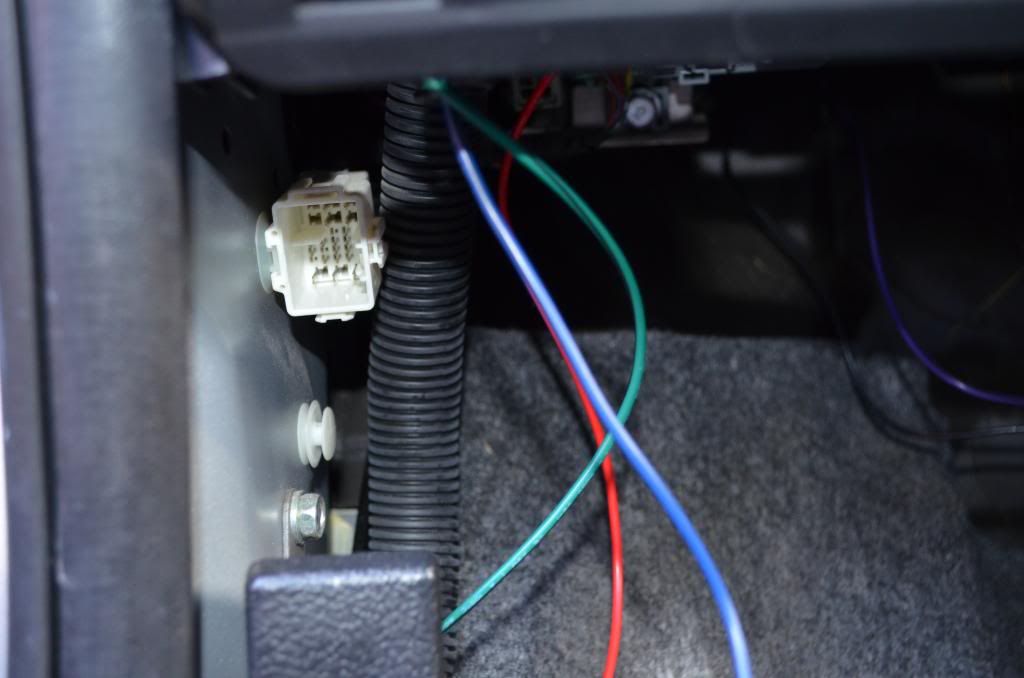
The white square female plug will have a plug going into it.
I pulled out the plug and worked on it from the fuse panel above.
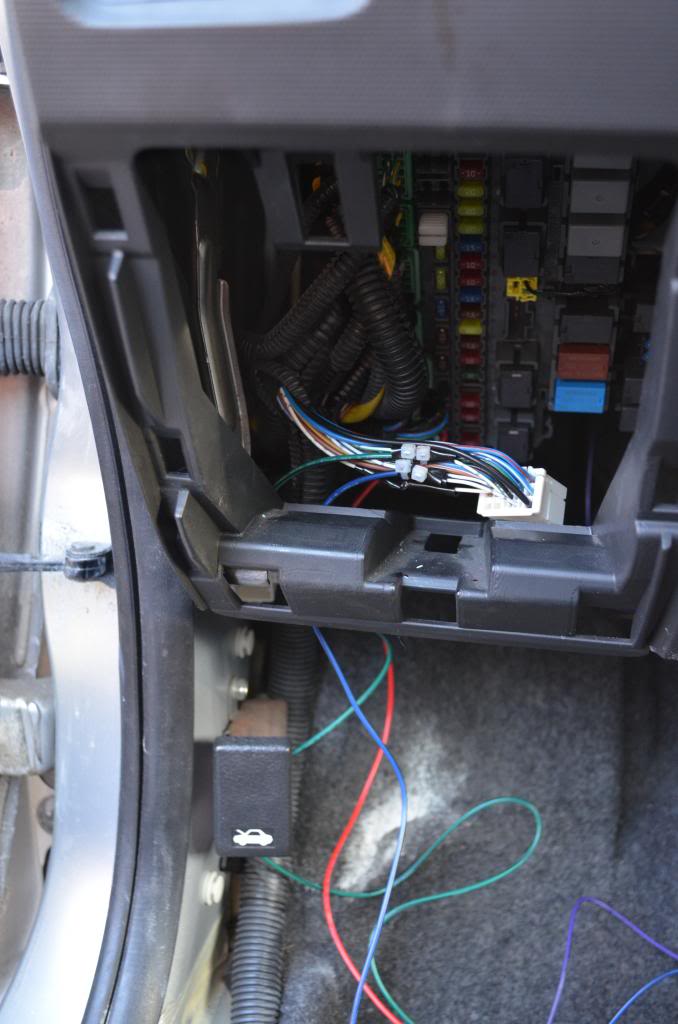
The colorful wire hanging down are from the Bulldog unit.
On that plug (following the wire diagram provided by bulldog on their website) There is a white wire with a green stripe and white withe a blue stripe. These are the unlock and lock wires.
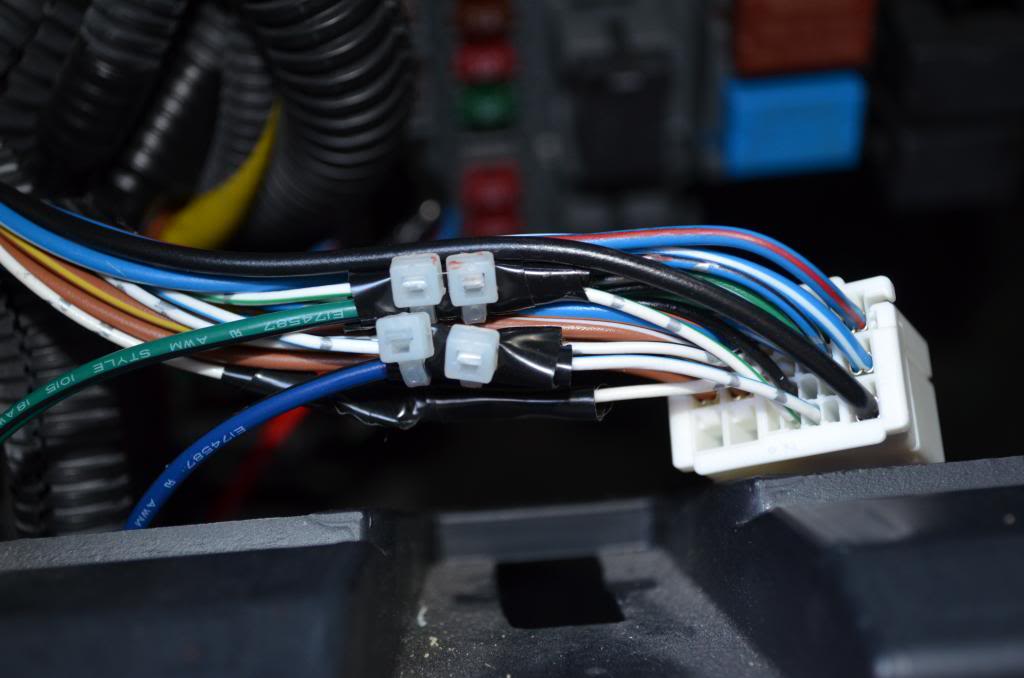
Attached the wires as per the methods recommended by the literature included with the bulldog unit. Green is spliced from unit into the white with green stripe wire on plug and the blue from the bulldog unit goes to the white with blue strip on the plug. I stripped away about an inch on each wire, spliced, e-taped, and then zip-tied (see those red splotches on the zip ties? It was so flipping cold out I couldn't feel that I was cutting myself)
Now that you have lock and unlock you need the power and ground. (battery is never unplugged fyi.)
The 12V power I took from the white wire on a plug pretty close to the other plug which you may have to remove the bottom kick panel for (all compression pop-out type things holding it on so not to difficult to get off)
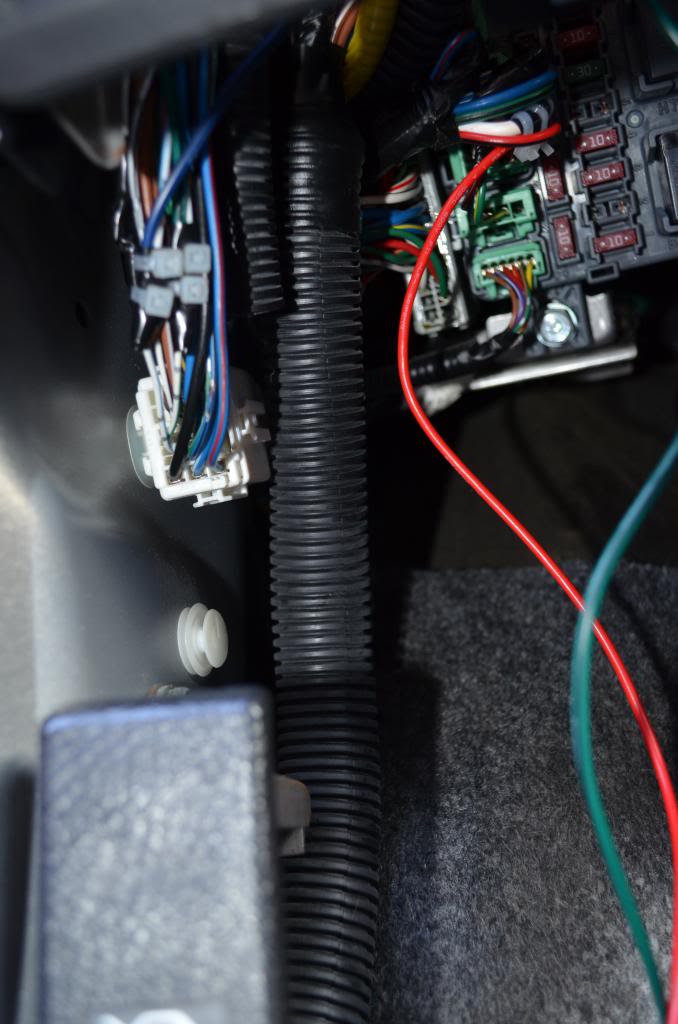
The wires on the plug with the 12V wire I used had wires of a heavier gauge the white plug I was a super pain to pull it out but eventually it came out. I stripped the fat white wire and spliced/taped/zip tied the red wire from the bulldog unit to the white wire on the plug.
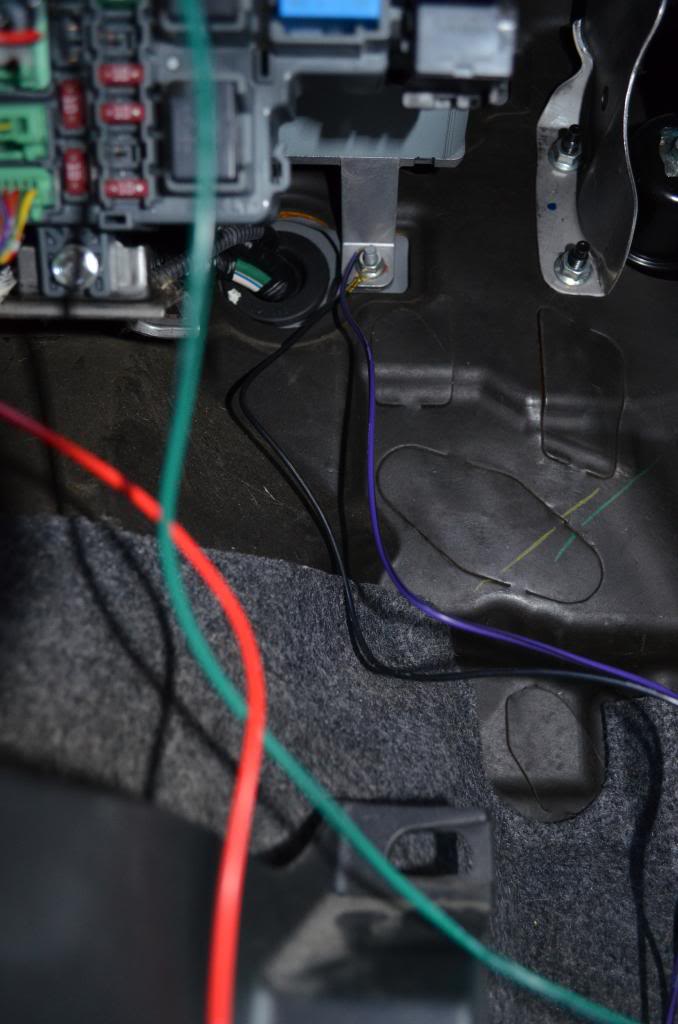
I grounded both the black and purple wire from the bulldog unit to the nut in the picture kind of behind the fuse panel where some wires go through to the engine.
At this point you should be able to click lock on one of the provided remotes and the doors should all lock. If you don't hear anything from the unit either you tapped into the wrong wire for 12V (use a multimeter or something to find) are the ground wires aren't connected properly.
After everything worked i zip tied extra wires to the unit and zip-tied the whole thing to a strut just inside to the right of the fuse panel. It's the bunch of colorful wires in the picture below. The yellow wire is the antenna and you can put it anywhere.
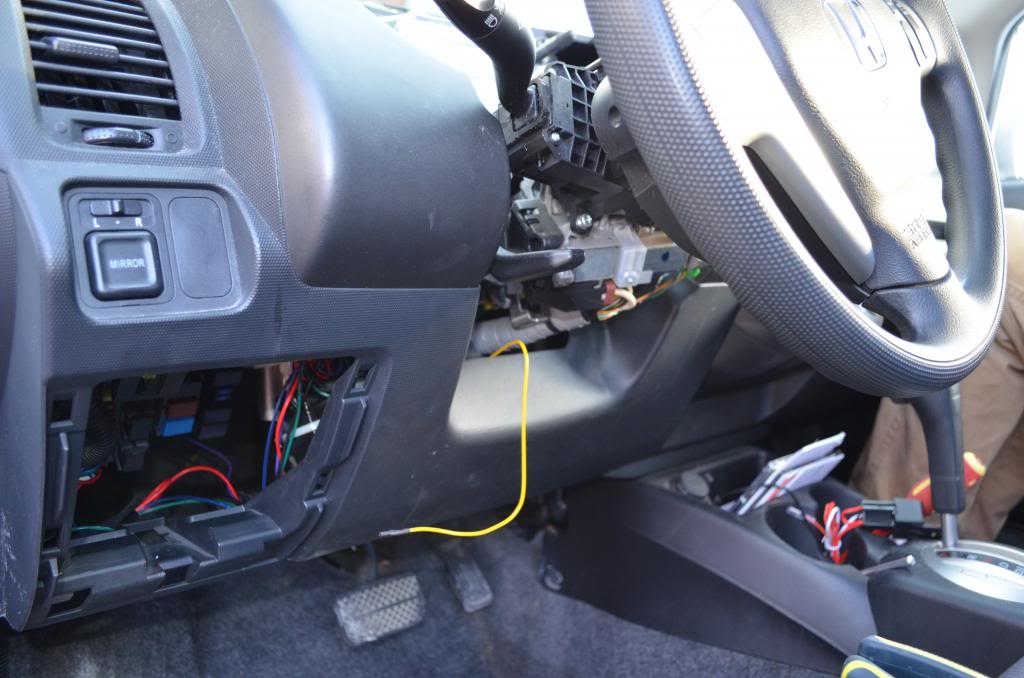
I ended up zip tying the antenna wire up behind the gauges as I had already taken that stuff apart trying to find the unlock/lock wire (ya...8 hours) but in the end that was probably the best place for it anyways and it just reached.

Slap everything back together and don't forget to turn off any dome lights to find the car dead the next morning an have a heart attack thinking you messed up some wiring somewhere that you'll never track down...
Other notes...
-I didn't use the extra plug thing the unit came with
-The circuit board i the unit was loose....so I jammed electrical tape in it.
-I can't remember what the default was but I programmed my remotes to be single pulse (not double). They should work out of the box regardless and it probably isn't a big deal if you leave them. Press start button on remote for 10 sec, and release. Press unlock 3 times and press star again to turn off dual pulse locks.
-Though it shouldn't loose power anyways, make sure you have your radio code (mine is on a white sticker in the glove box)
-I will try and splice in light when the whether gets warmer and possibly ammend this post.
-I apologize if I didn't explain something well.
Hope this helps someone tackle this test with less fear than I did.
UPDATE: Flashing lights
Remove the steering column cover and gauge cover. There are plugs going into the steering column visible from the top as seen here.
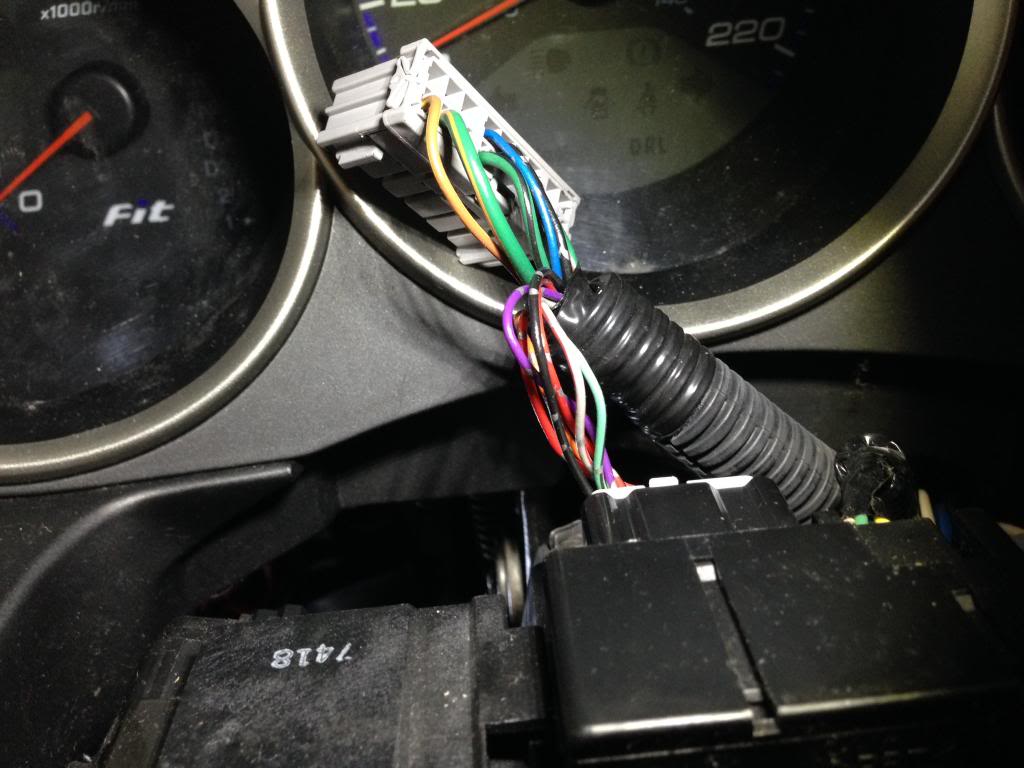
When you are looking from the driver seat it is the left most plug on the top. Wiggle it out and you'll see there is a blue wire. This is the Parking Light (-) you need for the light flash.
I had to carefully cut away the electrical tape so that I could pull back the plastic and have more wire to work with. It is a thinner wire so be gentle when stripping.
String the brown wire from the keyless module up to the blue wire of the plug. Join the wires as recommended in the module manual and tape.
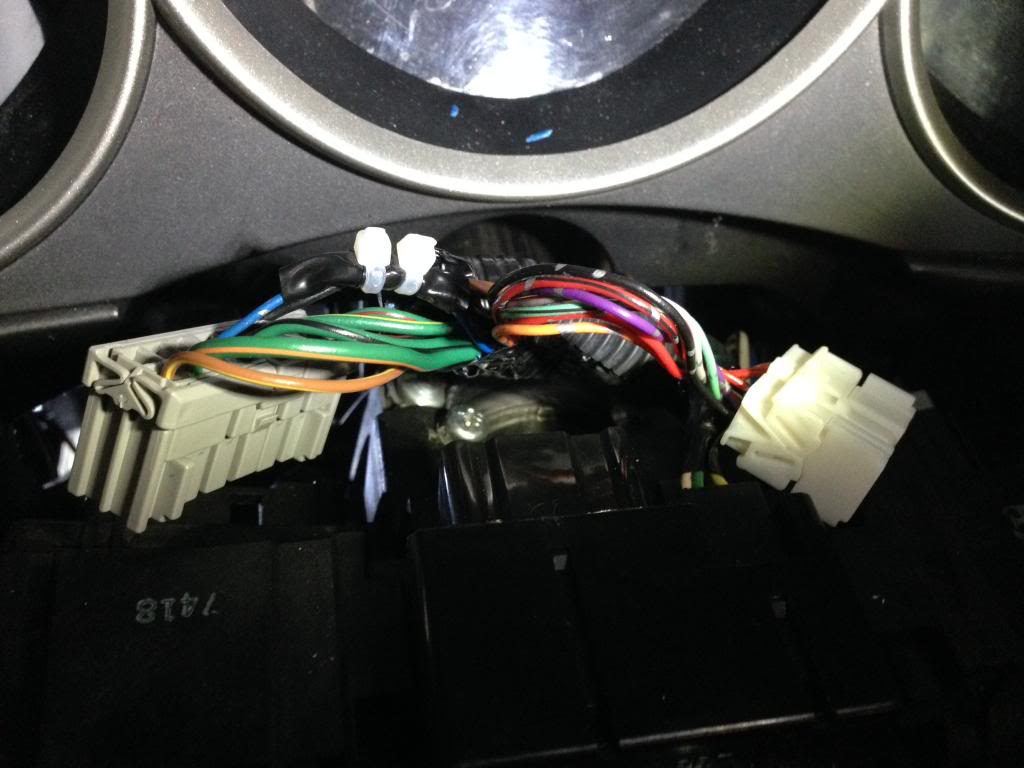
Check to make sure it works when plugged in and tape every thing up and clean up the wires. Slap the covers back on and presto. I don't think you can an change how the lights flash.
Best of Luck!
What follows is a rough explanation with photos of how to install a keyless bulldog security unit into a 2007 Honda Fit that already had power locks. I did not get around to splicing into the lights or horn so it will unlock/lock but beside the locks moving and that noise there will be no indication (UPDATE: See bottom of post). I may append this thread when the weather gets warmer and I do that.
I accept no responsibility and neither does fitfreak.net for any outcomes resulting from following this thread. Just trying to be helpful.
My wife has a 2007 model with power locks but no keyless entry. Her Fit recently had a recurrence of the broken/sticky/stuck driver's side lock as discussed in other threads that could not be fixed with lubricant. Replacing the lock would've been expensive and probably resulted in a 2nd key being needed. I scoured these forums but it looked like people had only gotten as far a determining it was very difficult is not impossible to get the easy install Honda Part (I am from Ontario and tried places all over Canada and the U.S. for the part).
As she was sick of crawling over her passenger side door to open the driver door and I am such a great husband I finally decided to buy a 3rd party Buldog Security ($87.10 + free shipping on Amazon.ca) keyless entry and brave the nest of wire beneath the plastic (never having done this kind of stuff before).
I spent about 8 hours doing this and could probably do it again in about an hour.
I originally took off way more paneling than was necessary but essentially only needed to take off the panel where the left side of your left foot would rest that has the hood pop lever. I worked from outside the car with the driver's door open and pulled the panel off carefully while pulling the hood release. The white circular thing and one more of those are the only things really holding it there.
The white square female plug will have a plug going into it.
I pulled out the plug and worked on it from the fuse panel above.
The colorful wire hanging down are from the Bulldog unit.
On that plug (following the wire diagram provided by bulldog on their website) There is a white wire with a green stripe and white withe a blue stripe. These are the unlock and lock wires.
Attached the wires as per the methods recommended by the literature included with the bulldog unit. Green is spliced from unit into the white with green stripe wire on plug and the blue from the bulldog unit goes to the white with blue strip on the plug. I stripped away about an inch on each wire, spliced, e-taped, and then zip-tied (see those red splotches on the zip ties? It was so flipping cold out I couldn't feel that I was cutting myself)
Now that you have lock and unlock you need the power and ground. (battery is never unplugged fyi.)
The 12V power I took from the white wire on a plug pretty close to the other plug which you may have to remove the bottom kick panel for (all compression pop-out type things holding it on so not to difficult to get off)
The wires on the plug with the 12V wire I used had wires of a heavier gauge the white plug I was a super pain to pull it out but eventually it came out. I stripped the fat white wire and spliced/taped/zip tied the red wire from the bulldog unit to the white wire on the plug.
I grounded both the black and purple wire from the bulldog unit to the nut in the picture kind of behind the fuse panel where some wires go through to the engine.
At this point you should be able to click lock on one of the provided remotes and the doors should all lock. If you don't hear anything from the unit either you tapped into the wrong wire for 12V (use a multimeter or something to find) are the ground wires aren't connected properly.
After everything worked i zip tied extra wires to the unit and zip-tied the whole thing to a strut just inside to the right of the fuse panel. It's the bunch of colorful wires in the picture below. The yellow wire is the antenna and you can put it anywhere.
I ended up zip tying the antenna wire up behind the gauges as I had already taken that stuff apart trying to find the unlock/lock wire (ya...8 hours) but in the end that was probably the best place for it anyways and it just reached.
Slap everything back together and don't forget to turn off any dome lights to find the car dead the next morning an have a heart attack thinking you messed up some wiring somewhere that you'll never track down...
Other notes...
-I didn't use the extra plug thing the unit came with
-The circuit board i the unit was loose....so I jammed electrical tape in it.
-I can't remember what the default was but I programmed my remotes to be single pulse (not double). They should work out of the box regardless and it probably isn't a big deal if you leave them. Press start button on remote for 10 sec, and release. Press unlock 3 times and press star again to turn off dual pulse locks.
-Though it shouldn't loose power anyways, make sure you have your radio code (mine is on a white sticker in the glove box)
-I will try and splice in light when the whether gets warmer and possibly ammend this post.
-I apologize if I didn't explain something well.
Hope this helps someone tackle this test with less fear than I did.
UPDATE: Flashing lights
Remove the steering column cover and gauge cover. There are plugs going into the steering column visible from the top as seen here.
When you are looking from the driver seat it is the left most plug on the top. Wiggle it out and you'll see there is a blue wire. This is the Parking Light (-) you need for the light flash.
I had to carefully cut away the electrical tape so that I could pull back the plastic and have more wire to work with. It is a thinner wire so be gentle when stripping.
String the brown wire from the keyless module up to the blue wire of the plug. Join the wires as recommended in the module manual and tape.
Check to make sure it works when plugged in and tape every thing up and clean up the wires. Slap the covers back on and presto. I don't think you can an change how the lights flash.
Best of Luck!
Last edited by jojome20; Apr 24, 2014 at 02:31 PM.


Thread
Thread Starter
Forum
Replies
Last Post
Fourwheels
1st Generation (GD 01-08)
3
Feb 11, 2011 08:25 PM
Fourwheels
2nd Generation (GE 08-13)
2
Feb 11, 2011 03:35 PM
