


Show us your navi systems!!!


Member
Joined: Aug 2007
Posts: 231
From: Neptune
I wanted to do the same thing you're doing. Buy an AVIC-D3 and load up an ipod with music videos and play them through the headunit....but alas, I live in one of the most grimey places in North America where even cars in gated communities get broken into =/

Member
Joined: Dec 2006
Posts: 514
From: Tromsø, Norway

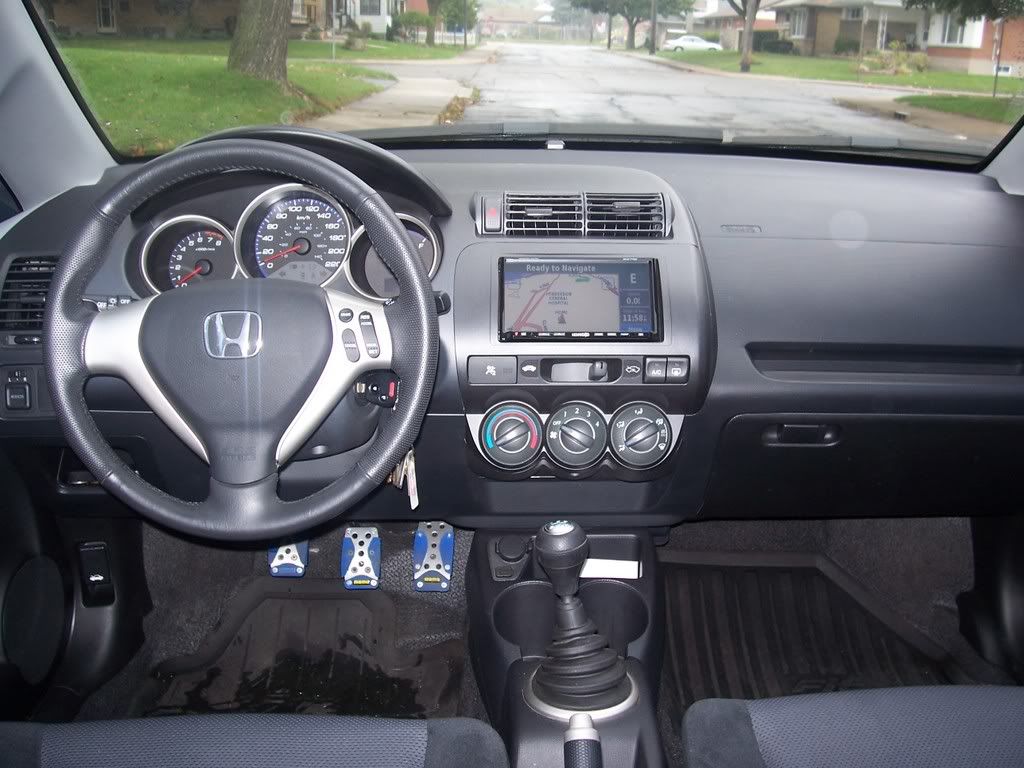
I have a Pioneer AVIC-HD3BT (or AVIC-Z2 as it is called in the US) and the orginal Honda 2DIN faceplate (part #08B00-SAA-611B):

It has built in GPS with text to speech and voice commands:

It has a built in harddrive for music, and play MP3 from CD or USB or MP3 players like a iPod or other types:

And it also play DVD-movies.
The maps for the GPS is stored on the harddrive so you can play back music from a CD at the same time as you are using the navigation system. It will mute the music when there is a voice guide command.
I also have a Bluetooth adapter so I can use the system as a handsfree system for my mobilephone. There is a few other things it can do, like this display:

You can also change the background for the menus with a image from a CD.
You can also add other things like more displays for the rear, or a videoinput, and a rear-view camera or other video sources.
It has built in GPS with text to speech and voice commands:
It has a built in harddrive for music, and play MP3 from CD or USB or MP3 players like a iPod or other types:
And it also play DVD-movies.
The maps for the GPS is stored on the harddrive so you can play back music from a CD at the same time as you are using the navigation system. It will mute the music when there is a voice guide command.
I also have a Bluetooth adapter so I can use the system as a handsfree system for my mobilephone. There is a few other things it can do, like this display:
You can also change the background for the menus with a image from a CD.
You can also add other things like more displays for the rear, or a videoinput, and a rear-view camera or other video sources.
New Member
Joined: Oct 2007
Posts: 19
From: Ontario
Its a metra kit. The only reason why I went with this system was b/c it plays back divx files and it was free. It has all the features as any other system from navi to ipod play with usb files, and is easy to upgrade. I have been thinking about replacing it for a computer double din type system. But money is tight.

Thread Starter
|
Member
Joined: Sep 2007
Posts: 2,055
From: The Unknown
very nice FONIX. i wish i had electronic climate controls. haha. how do you like your setup. i heard that there is alot of menus to go through to operate them but i never really looked at them all that hard. i was stuck between the kenwood, panasonic, and eclipse. let me know if i am wrong though.
very nice everyone. lets keep this going.
very nice everyone. lets keep this going.

Which brand HU Kit that you use???

Member
Joined: Mar 2007
Posts: 261
From: Sacramento, Ca
no ..you are aloud to have radar detectors. ive gotten pulled over plenty of times to know. (lucky for me ...no tickets!) but i have my garmin 680 and magellean 4250.(i normally use the 4250) and my radar detector sitting there on my dash...they never say anything about it.
i dont get pulled over for speeding, i usually get pulled over for stupid shit like loud music, or exhaust.
i dont get pulled over for speeding, i usually get pulled over for stupid shit like loud music, or exhaust.


Member
Joined: Jan 2008
Posts: 109
From: SoCal
i have seen alot of seperate threads on navigation and alot of people with questions on what systems work best and general questions. hopefully this thread can help some fitfreakers out with there navi purchases. questions and answers are always welcome. this thread is for all versions of navi indash and dash mounted. also likes and dislikes are always helpful.
heres my setup. an eclipse avn-5510 in a metra kit.


the eclipse is dvd based so its not exactly the fastest system out there but its quick enough if i miss a turn to find a new route before i get there. its touch screen so its easy to adjust whatever i need. i had it installed at circuit city within a couple hours (i wasnt really wanting to get involved with all the wiring). my antenna is located behind my regular antenna and it is magnetic so it just sits there. any questions please ask. hopefully this thread will be of some good help to everyone.
Joshua
heres my setup. an eclipse avn-5510 in a metra kit.


the eclipse is dvd based so its not exactly the fastest system out there but its quick enough if i miss a turn to find a new route before i get there. its touch screen so its easy to adjust whatever i need. i had it installed at circuit city within a couple hours (i wasnt really wanting to get involved with all the wiring). my antenna is located behind my regular antenna and it is magnetic so it just sits there. any questions please ask. hopefully this thread will be of some good help to everyone.
Joshua
Thread Starter
|
Member
Joined: Sep 2007
Posts: 2,055
From: The Unknown
the unit, instal, metra kit, and 4 year warranty was a little over $2,100. not a bad price but i could have found a better one. i just like circuit city so thats why i went with them.




Member
Joined: Dec 2006
Posts: 514
From: Tromsø, Norway
very nice FONIX. i wish i had electronic climate controls. haha. how do you like your setup. i heard that there is alot of menus to go through to operate them but i never really looked at them all that hard. i was stuck between the kenwood, panasonic, and eclipse. let me know if i am wrong though.
very nice everyone. lets keep this going.
very nice everyone. lets keep this going.
But I have still a few things I can add in the future: iPod adapter, rear-view camera (do you realy need it on this small car?), rear displays (I dont have kids so I dont need it yet). I can also add a 6 disc CD/DVD changer from Pioneer or other audio equipment but I am using the harddrive for music and for now that is enough for me.
The menues looks good and it is easy to navigate in them. There are one hardware button on the front for selecting "AV" (Audio/Video) and it take you directly to the last menu in the AV system that you used. Then you have the "map" hardware button on the front that takes you directly to the map or navigations menu, and also here you go directly to that menu that you have selected of the navigation before.
The next button is "Menu", here you go to more advanced menu settings. If you press and hold that "Menu" button you go directly to the phone menus.
There are also those voice commands, but I dont speak English very well and therefor I dont use that function. Well, I can get them to work, but they are not easy to use, and to slow.

Thread Starter
|
Member
Joined: Sep 2007
Posts: 2,055
From: The Unknown
Tyler is right. with all the in dash navigation systems you have a map disk that has all the info on it and once a year or so you should get a new disk so its as up to date as possible. you dont have to but its a better idea to have the new roads and POI's (points of interest).