Installed Pioneer FH-P8000BT today


Thread Starter
|
Member

Joined: Oct 2006
Posts: 69
From: CA
 Installed Pioneer FH-P8000BT today
WEll as the title states i intalled the Pioneer FH-P8000BT today. It went pretty well and looks great!
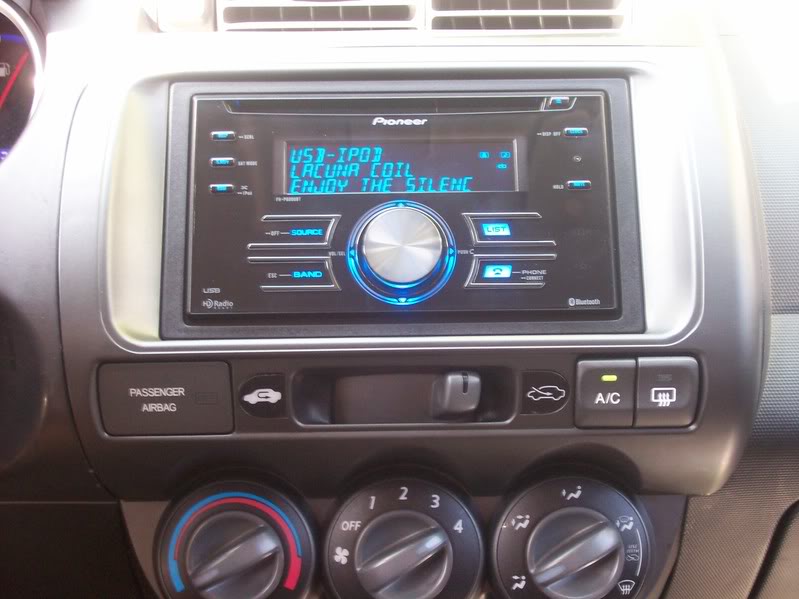
It works great, I've only played with it a little bit but the Bluetooth Phone sounded good and the iPod controls work great, pretty simple and straight forward.
It works great, I've only played with it a little bit but the Bluetooth Phone sounded good and the iPod controls work great, pretty simple and straight forward.

Thread Starter
|
Member
Joined: Oct 2006
Posts: 69
From: CA
It was on sale at bestbuy.com for about $290. With tax and shipping $327. I didn't get DVD or Nav cause this is My wifes car, she wanted somethin simple that looked some what stock and she could use with her iPod, she has the base model so no AUX input. Also the hands free bluetooth capability because starting in July is that cell phone law where you have to have a hands free. With a DVD or Nav unit i would still have to either buy seperate bluetooth hands free or get the pioneer unit that is $200.


 (Unless it's another Fit head unit)

Member
Joined: Apr 2007
Posts: 84
From: Grand Blanc, MI
Looks great! I have the same radio waiting to be installed...just got the dash kit today!
Question for you: I was looking over the wire harness and the Pioneer one has a black cable with a terminal on the end of it...you don't actually have to ground that to the chassis do you??? It just connects to the other black wire, right?
Any tips for installing this? I've got the exact same setup...same dash kit too.
Question for you: I was looking over the wire harness and the Pioneer one has a black cable with a terminal on the end of it...you don't actually have to ground that to the chassis do you??? It just connects to the other black wire, right?
Any tips for installing this? I've got the exact same setup...same dash kit too.

Member
Joined: Feb 2007
Posts: 779
From: Montreal' Canada

Looks great! I have the same radio waiting to be installed...just got the dash kit today!
Question for you: I was looking over the wire harness and the Pioneer one has a black cable with a terminal on the end of it...you don't actually have to ground that to the chassis do you??? It just connects to the other black wire, right?
Any tips for installing this? I've got the exact same setup...same dash kit too.
Question for you: I was looking over the wire harness and the Pioneer one has a black cable with a terminal on the end of it...you don't actually have to ground that to the chassis do you??? It just connects to the other black wire, right?
Any tips for installing this? I've got the exact same setup...same dash kit too.
Just connect the black wire to the ground wire on the harness.
Thread Starter
|
Member
Joined: Oct 2006
Posts: 69
From: CA
Patience, It wasn't that bad, getting the A/C control cables off was the hardest part. They disconnect behind the glove box and have a little tab you have to push down in order to slide them off. There plenty of info and tips in other threads too in case you get stuck on anything. Good luck with the install and enjoy the HU, it works awesome

New Member
Joined: Apr 2010
Posts: 6
From: Plantation, FL
Came across this post from a long time ago but I really like this stereo and I am wondering if you can sync the bluetooth with an iPhone? I have heard that it doesn't work with the iPhone and that is does work with it....do you know? Thanks!
Member
Joined: Apr 2007
Posts: 84
From: Grand Blanc, MI
While I can't say for sure whether the iPhone works with it, I can tell you that I've had 3 or 4 different phones since I installed this stereo (which I still LOVE, by the way). Every one of the phones has worked find with the stereo. I currently have a Droid and the bluetooth phone calls work great! On top of that, I can stream Pandora to the radio through bluetooth as well. I would think that the iPhone would work just fine, but unfortunately I can't confirm that.
New Member
Joined: Apr 2010
Posts: 6
From: Plantation, FL
I kno it's a lot to ask but do you have a friend with an iPhone that could try it out?? It's an expensive stereo and I love the look of it and it appears to do what I want but I want to be sure. Also, I am not a car person (obvious right!) but where can I have it installed? And how does it look off? I worry it might attract the wrong kind of attention. Thanks fo all your help!!

Member
Joined: Mar 2010
Posts: 20
From: Seabrook, TX USA
I just installed this two weeks ago. I have an iPhone and it works GREAT. My calls come in via bluetooth and the bluetooth audio all work great from the iPhone.
On an unrelated note...I STILL cannot get my radio to work and have not found any solutions to wire up my antenna adapter cable to fix the garbage radio signal I'm getting.
On an unrelated note...I STILL cannot get my radio to work and have not found any solutions to wire up my antenna adapter cable to fix the garbage radio signal I'm getting.