DIY: Auxiliary on Base Fit


New Member
Joined: Apr 2008
Posts: 2
From: Columbus, Ohio
Okay, I know this thread has been going on for quite a while. But I just want to run my "plan" by those of you who might have done it already to see if i'm on the right track:
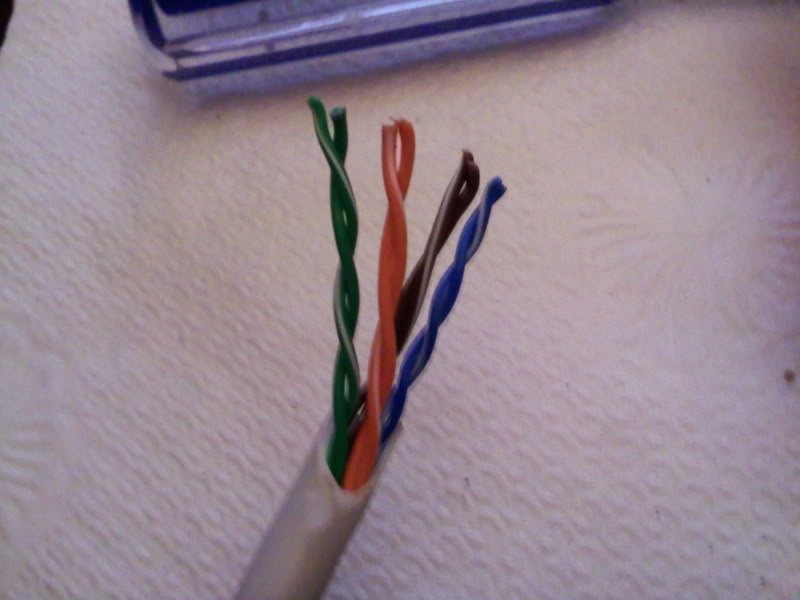
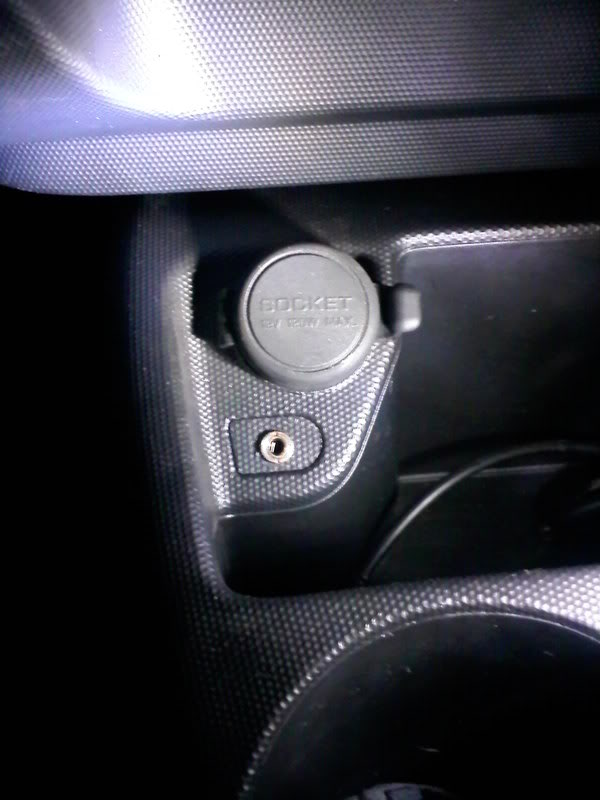
I ordered the OEM Aux Jack today and plan to buy the following supplies - 1 5-pin housing unit, 1 CAT-5 cable, 10 RS-232 Female Headers, and electric tape.
1. I will cut off each end of the CAT-5 cable.
2. I will solder the RS-232 female headers to each wire from the CAT-5 cable on either end.
3. I will attach all five wires on one end of the CAT-5 to the 5-pin housing unit and then plug it into the OEM Aux Jack.
4. I will plug in each of the five wires on the other end of the CAT-5 to the corresponding spots on the back of the stereo.
Obviously I'll follow all directions as far as pulling out the stereo and getting to the spot to put in the new aux jack.
Does this all sound like it will work? Make sense?
I figured I'd just use the CAT-5 *instead* of the ID bit audio cables soldered to a CAT-5. Unless there's a benefit to this?? Just seemed like a whole lot of extra wires.
I plan to hook up my Sirius Stiletto as soon as I get all of this done.
Anyone out there using a Stiletto in their Fit? I'm still at a loss for where I'll attach the dock. Any hints would be appreciated.
Also, can someone point me out to a good "how to" for hooking up the satellite antenna?
Thanks!!!
I ordered the OEM Aux Jack today and plan to buy the following supplies - 1 5-pin housing unit, 1 CAT-5 cable, 10 RS-232 Female Headers, and electric tape.
1. I will cut off each end of the CAT-5 cable.
2. I will solder the RS-232 female headers to each wire from the CAT-5 cable on either end.
3. I will attach all five wires on one end of the CAT-5 to the 5-pin housing unit and then plug it into the OEM Aux Jack.
4. I will plug in each of the five wires on the other end of the CAT-5 to the corresponding spots on the back of the stereo.
Obviously I'll follow all directions as far as pulling out the stereo and getting to the spot to put in the new aux jack.
Does this all sound like it will work? Make sense?
I figured I'd just use the CAT-5 *instead* of the ID bit audio cables soldered to a CAT-5. Unless there's a benefit to this?? Just seemed like a whole lot of extra wires.
I plan to hook up my Sirius Stiletto as soon as I get all of this done.
Anyone out there using a Stiletto in their Fit? I'm still at a loss for where I'll attach the dock. Any hints would be appreciated.
Also, can someone point me out to a good "how to" for hooking up the satellite antenna?
Thanks!!!




Member
Joined: Mar 2008
Posts: 587
From: Wash DC Metro

Can I access the rear of the head unit without pulling it?
If I get a pre-made CD changer connector, is there enough room to get the connector mated with the corresponding socket on the back of the head unit by just pulling the glove box and maybe one or two other simple items (ducts, covers)? It appears from the musiclink instructions as if I could get a little access to the back without pulling the headunit but I though I'd ask those who've actually worked in there. I noticed the CD changer socket is on the side of the head unit closest to the glove box.
I may try an aftermarket aux jack/mp3 player that is pre-wired to work off the CD changer socket. Before I shell out the small bucks for the player, I'll try pulling the glove box and see how close I can get. Based on the excellent write-ups here, I'd rather not pull the headunit.
UPDATE: I pulled the cover, vent and glove box. There is just enough room to squeeze a couple of fingers in behind the stereo and touch the CD changer connector. Like an NFL receiver - if I can touch it, I should be able to catch it. I'm purchasing the MP3 player and will try to get it connected without pulling the headunit. Will post pictures and results when it arrives.
I may try an aftermarket aux jack/mp3 player that is pre-wired to work off the CD changer socket. Before I shell out the small bucks for the player, I'll try pulling the glove box and see how close I can get. Based on the excellent write-ups here, I'd rather not pull the headunit.
UPDATE: I pulled the cover, vent and glove box. There is just enough room to squeeze a couple of fingers in behind the stereo and touch the CD changer connector. Like an NFL receiver - if I can touch it, I should be able to catch it. I'm purchasing the MP3 player and will try to get it connected without pulling the headunit. Will post pictures and results when it arrives.
Last edited by Rob22315; Apr 16, 2008 at 07:33 PM. Reason: Updated info
Member
Joined: Jun 2006
Posts: 118
From: South Side of California
OK... convinced me
I will begin this mod tomorrow on my lunch break at my shop and figure with me and my buddy... should be able to wrap it up in less than an hour. I have ordered the OEM Aux. Jack and going the CAT6 route. Hope all comes out well and will keep you all informed. Reason for the delay in this attempt... well, I just finally gave in to the world of the IPOD. I tried to fight it... but sadly couldn't. Now... I wonder how I got by without one for so long.
Thanks to you all for being brave in this journey. Much appreciated!
Update: 4/21/08
Did the mod... not too happy with the sound. I am now having issues where it jumps from AUX to the last setting whether it be AM or FM or CD. Depending on the last setting I was on prior to hooking up the IPOD. Gonna try and figure that one out. Seems to get worse when the volume is set max on the IPOD. Happens less when the IPOD volume is reduced. Don't know what the direct connection to that is... but I am working on it.
Anyone else having this problem or know the solution??? Much appreciated.
OH... and it took longer then the "about one hour" thing. Psshhh!!!
Thanks to you all for being brave in this journey. Much appreciated!
Update: 4/21/08
Did the mod... not too happy with the sound. I am now having issues where it jumps from AUX to the last setting whether it be AM or FM or CD. Depending on the last setting I was on prior to hooking up the IPOD. Gonna try and figure that one out. Seems to get worse when the volume is set max on the IPOD. Happens less when the IPOD volume is reduced. Don't know what the direct connection to that is... but I am working on it.
Anyone else having this problem or know the solution??? Much appreciated.
OH... and it took longer then the "about one hour" thing. Psshhh!!!
Last edited by jo3blo3; Apr 21, 2008 at 01:06 PM.

Member
Joined: May 2008
Posts: 110
From: Port Jervis, NY
Smeister and the rest of you ROCK!!!!
I just installed the AUX in my base Fit for, get this.....$4.00.
Sure, it took me five hours but thats because the only other thing
I have ever soldered was my battery packs for my Rc car.
I would recommend for anyone attempting this that you get the actual
plug from Honda (previously mentioned I'm sure) cause soldering
directly on to the unit is stupid! Yeah it works but.... one wrong move
and poof!
I'll post pictures later once I get the plug and make my setup a little
less Ghetto. Basically what I did was put an Ipod docking station on my dash. That lets me control the Ipod by remote.
I just installed the AUX in my base Fit for, get this.....$4.00.
Sure, it took me five hours but thats because the only other thing
I have ever soldered was my battery packs for my Rc car.
I would recommend for anyone attempting this that you get the actual
plug from Honda (previously mentioned I'm sure) cause soldering
directly on to the unit is stupid! Yeah it works but.... one wrong move
and poof!
I'll post pictures later once I get the plug and make my setup a little
less Ghetto. Basically what I did was put an Ipod docking station on my dash. That lets me control the Ipod by remote.

Member
Joined: Jun 2008
Posts: 127
From: New Jersey
Glad to see you put the diagrams to good use. Now I will finally have to do it myself. I've soldered before, but never shrinkwrap - what do you use to shrink the shrinkwrap? I think Radio Shack probably has the 3.5mm jacks as well.
By the way, I put in a request for Honda to make a kit for this with College Hills Honda and when a Honda rep called to survey. I like this method much better for cost and personal satisfaction. All we would need now is some sort of cap or plug to look like the stock install.
By the way, I put in a request for Honda to make a kit for this with College Hills Honda and when a Honda rep called to survey. I like this method much better for cost and personal satisfaction. All we would need now is some sort of cap or plug to look like the stock install.




New Member
Joined: Aug 2008
Posts: 1
From: Dallas,Pa
To TeamTMC, the aux jack completed the AUX DET to ground circuit when the plug is plugged into the jack. If, at the radio end, you jumper AUX DET to Ground, you only will need 3 wires to the aux jack: Left, Right and Shield. Doing this, I simply took a old CPU fan cable and soldered a audio cable on the end for the jack and plugged it in. The other end, at the radio, I used RD232 pins that I had around and did the aux-gnd jump right there.


New Member
Joined: Oct 2007
Posts: 13
From: Cape Cod
Guys radioshack didn't have a 4 pin connector (3.5mm) so i got a 5 pin.. can someone tell me if the configuration is the same? This is what i'm using but i tried it and it didn't work..
I've got wires solder to pins 1 - 4 and then i have it connected like smeisters original post. Do i need something connected to pin 5? Please help..

I've got wires solder to pins 1 - 4 and then i have it connected like smeisters original post. Do i need something connected to pin 5? Please help..
Today I've created a cable using Cat 5, the above jack, and some single pin connectors on the other end.
I don't really understand the diagram on the back of the box for the AUX jack. But it seems like I'd have to use 2 and 5 for L and R speakers and then 1 for the grounds. But what about AUX DET (pin B15) what would that connector to?
I didn't want to blow 40 dollars on a fancy AUX jack but I'm not sure if this 3 conductor one will cut it in this application.
New Member
Joined: Oct 2007
Posts: 13
From: Cape Cod
Sorry to bump an old thread but has anyone ever figured out how to wire one of these exact AUX jacks up?
Today I've created a cable using Cat 5, the above jack, and some single pin connectors on the other end.
I don't really understand the diagram on the back of the box for the AUX jack. But it seems like I'd have to use 2 and 5 for L and R speakers and then 1 for the grounds. But what about AUX DET (pin B15) what would that connector to?
I didn't want to blow 40 dollars on a fancy AUX jack but I'm not sure if this 3 conductor one will cut it in this application.
Today I've created a cable using Cat 5, the above jack, and some single pin connectors on the other end.
I don't really understand the diagram on the back of the box for the AUX jack. But it seems like I'd have to use 2 and 5 for L and R speakers and then 1 for the grounds. But what about AUX DET (pin B15) what would that connector to?
I didn't want to blow 40 dollars on a fancy AUX jack but I'm not sure if this 3 conductor one will cut it in this application.
I can use the 3 conductor connector but the only way it will work is if DET is grounded all the time. Which means the head unit will think that there is always something connected via AUX. Really, you need 4 conductors to do this properly: grounds, left, right, and detection.
Is there any drawback to having detection wired to ground? The head unit will always think a device is connected, but I can still use the buttons on the head unit to switch from AUX to CD or radio right? Can anyone confirm this?

Member
Joined: Jul 2008
Posts: 100
From: Pittsburgh, PA
i have done this on my base with the OEM honda aux jack. I ended up having to solder the wires to the back of the head unit, as the pin connectors i had were too wide to sit next to each other.
at first i was scared because i only had audio on the left side of the car, then i realized my plug was mono. now the aux jack works perfect and sound quality is great, no problems of the above mentioned kind.
if you are having problems i would check your connections, make sure they are all good and solid, and heat shrink EVERYTHING, so that no accidental jumping can happen from one pin to another.
Aceldama, i know that when my ipod is plugged in i can switch to radio and cd, so i think you would be fine if it was always "plugged in"
at first i was scared because i only had audio on the left side of the car, then i realized my plug was mono. now the aux jack works perfect and sound quality is great, no problems of the above mentioned kind.
if you are having problems i would check your connections, make sure they are all good and solid, and heat shrink EVERYTHING, so that no accidental jumping can happen from one pin to another.
Aceldama, i know that when my ipod is plugged in i can switch to radio and cd, so i think you would be fine if it was always "plugged in"
New Member
Joined: Oct 2007
Posts: 13
From: Cape Cod
So I did the install tonight for the AUX jack, kind of a pain in the ass but it would be much easier to do it a second time.
I ended up using a simple 3 conductor jack.
I wired B3, B5, and B15 to pin 1 (ground)
And B13 to left and B14 to right on the jack. I used a Cat 5 cable and crimp-on bullet connectors + hot glue to keep them secure on the back of the head unit.
It sounds awesome, so thanks for all the information.
I ended up using a simple 3 conductor jack.
I wired B3, B5, and B15 to pin 1 (ground)
And B13 to left and B14 to right on the jack. I used a Cat 5 cable and crimp-on bullet connectors + hot glue to keep them secure on the back of the head unit.
It sounds awesome, so thanks for all the information.

Member
Joined: Apr 2008
Posts: 81
From: Peoria, Illinois

Am what I'm hearing is that the auxiliary mode setting on 1st generation Fits don't really play mp3s or Ipods? You have to do some extra wiring?
I was hoping to use this auxiliary mode and play my Ipod in the new 2008 Sport I recently bought.
I was hoping to use this auxiliary mode and play my Ipod in the new 2008 Sport I recently bought.

New Member
Joined: Sep 2008
Posts: 4
From: MA
using a 5-pin connector
gmane (and Aceldama, who knows this already):
I bought this same jack from radioshack. After a bit of playing around, I found that if I connect B3, B4 and B15 to pin 1, B13 to pin 2 and B14 to pin 5, it works beautifully.
By connecting B3, B4 and B15 permanently, the radio 'thinks' that aux is always on, in other words, you can switch to aux even if there is nothing plugged in. A better solution would be a different plug (perhaps the OP one?) that only connects B15 to B3 and B4 if and when something is plugged in. That way, with nothing plugged in, you cannot switch to aux at all. This is like the CD player, which you can only switch to if a CD is in the player.
But hey, it works beautifully, I can still switch to radio or CD and there is no interference!
Woohoo!
Thanks to smeister for the original posting!
Mark
I bought this same jack from radioshack. After a bit of playing around, I found that if I connect B3, B4 and B15 to pin 1, B13 to pin 2 and B14 to pin 5, it works beautifully.
By connecting B3, B4 and B15 permanently, the radio 'thinks' that aux is always on, in other words, you can switch to aux even if there is nothing plugged in. A better solution would be a different plug (perhaps the OP one?) that only connects B15 to B3 and B4 if and when something is plugged in. That way, with nothing plugged in, you cannot switch to aux at all. This is like the CD player, which you can only switch to if a CD is in the player.
But hey, it works beautifully, I can still switch to radio or CD and there is no interference!
Woohoo!
Thanks to smeister for the original posting!
Mark

gmane (and Aceldama, who knows this already):
I bought this same jack from radioshack. After a bit of playing around, I found that if I connect B3, B4 and B15 to pin 1, B13 to pin 2 and B14 to pin 5, it works beautifully.
By connecting B3, B4 and B15 permanently, the radio 'thinks' that aux is always on, in other words, you can switch to aux even if there is nothing plugged in. A better solution would be a different plug (perhaps the OP one?) that only connects B15 to B3 and B4 if and when something is plugged in. That way, with nothing plugged in, you cannot switch to aux at all. This is like the CD player, which you can only switch to if a CD is in the player.
But hey, it works beautifully, I can still switch to radio or CD and there is no interference!
Woohoo!
Thanks to smeister for the original posting!
Mark
I bought this same jack from radioshack. After a bit of playing around, I found that if I connect B3, B4 and B15 to pin 1, B13 to pin 2 and B14 to pin 5, it works beautifully.
By connecting B3, B4 and B15 permanently, the radio 'thinks' that aux is always on, in other words, you can switch to aux even if there is nothing plugged in. A better solution would be a different plug (perhaps the OP one?) that only connects B15 to B3 and B4 if and when something is plugged in. That way, with nothing plugged in, you cannot switch to aux at all. This is like the CD player, which you can only switch to if a CD is in the player.
But hey, it works beautifully, I can still switch to radio or CD and there is no interference!
Woohoo!
Thanks to smeister for the original posting!
Mark