


any recommended GPS for Fit LX ?


Member
Joined: Jun 2016
Posts: 948
From: Foothills of the Smokies, east Tennessee

I just use a , mmmmm, Garmin Nuvi Forty-something and set it (with window mount attached) in the driver's side dash cupholder.....easy to see, easy to hear, and best of all, nothing cluttering up the view...I hate stuff mounted to the windshield ....the little driver's side window ahead of the door was a great mount spot, but stopped doing that when I got my windows tinted.... tint dude says, yeah, it'll "work," but it may mess up the tint and void his warranty....dunno if that's for real (could be), but, so far he's stood by his work...we had my wife's Forte SX tinted in early '11, and it started peeling just a tiny bit at the top corner of the driver's window - we went with 30 on her car, he had no 30 (says little demand, folks want darker or legal.....whatever) so he ordered in a roll just to do her window, retinted it promptly and charged us nada.....but I digress....yeah, I just use a Garmin Nuvi whatever (4.3", perhaps, lifetime free map updates) ...works just fine

Member
Joined: Sep 2014
Posts: 150
From: Mankato, MN
I just use a , mmmmm, Garmin Nuvi Forty-something and set it (with window mount attached) in the driver's side dash cupholder.....easy to see, easy to hear, and best of all, nothing cluttering up the view...I hate stuff mounted to the windshield ....the little driver's side window ahead of the door was a great mount spot, but stopped doing that when I got my windows tinted.... tint dude says, yeah, it'll "work," but it may mess up the tint and void his warranty....dunno if that's for real (could be), but, so far he's stood by his work...we had my wife's Forte SX tinted in early '11, and it started peeling just a tiny bit at the top corner of the driver's window - we went with 30 on her car, he had no 30 (says little demand, folks want darker or legal.....whatever) so he ordered in a roll just to do her window, retinted it promptly and charged us nada.....but I digress....yeah, I just use a Garmin Nuvi whatever (4.3", perhaps, lifetime free map updates) ...works just fine


standalone GPS was cool pre-2010. i have a couple of older gen garmins just sitting around in my parts bin.




Member
Joined: Jan 2016
Posts: 302
From: Georgia, USA
Yes it does but I haven't used it yet. It also has lifetime map and traffic updates which was a requirement I had for a GPS. Also, I wanted a 6" screen and that is a huge upgrade from my 4.3" TomTom - no more squinting to see the display screen.

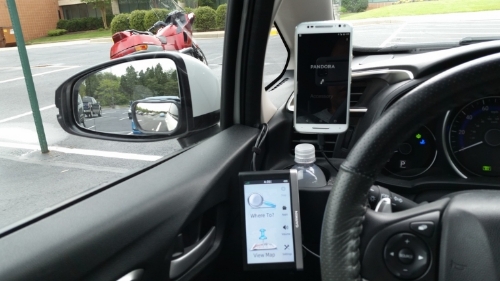
I've got a Garmin Nuvi 2598, that I use in portrait mode. Honestly I don't use it much as I've been using Waze a lot more. Waze has real time traffic, rerouting and hazard warnings are much better than the delayed Garmin traffic feature.

Member
Joined: Mar 2007
Posts: 1,704
From: Second house on the left
One thing I like about Garmin (besides the EcoRouteHD, which provides 'instrument' displays and a code reader) is that it differentiates between paved and dirt roads. It also is more concise with directions VS Waze or Google, IMO.
OTOH it's just more convenient to use a phone app for navigation these days, after all you ALWAYS have your phone on you, right?
Who uses Pokemon Go for navigation? LOL
OTOH it's just more convenient to use a phone app for navigation these days, after all you ALWAYS have your phone on you, right?
Who uses Pokemon Go for navigation? LOL

Member
Joined: Apr 2009
Posts: 2,421
From: Upstate New York
I use the Garmin Nuvi-something or other that I got three years ago as a "35 year" gift from my employer. Came with lifetime map updates. I attached the suction cup mount to the quarter window to the driver's left, where it's easily visible but doesn't block my view out the windshield.
I ended up buying a couple of right angle micro USB extension cords from eBay, so I could route the power cable down the edge of the driver's door, under the dash, behind the clutch and steering column, behind the console then along the right side of the console and into the "notch" under the armrest. I then plugged the power adaptor into the power plug in the console. Neat and out of sight.
Where I live, using my smartphone for navigation won't work. Once you're off the main highways, there are vast areas with no, or spotty service, and that's where you need to know where you are.
I ended up buying a couple of right angle micro USB extension cords from eBay, so I could route the power cable down the edge of the driver's door, under the dash, behind the clutch and steering column, behind the console then along the right side of the console and into the "notch" under the armrest. I then plugged the power adaptor into the power plug in the console. Neat and out of sight.
Where I live, using my smartphone for navigation won't work. Once you're off the main highways, there are vast areas with no, or spotty service, and that's where you need to know where you are.
Last edited by Uncle Gary; Aug 3, 2016 at 08:20 AM.
Yah I use a Nuvi on my older hobby car as I never park the car anywhere and run ecoRoute. No worries of people breaking into the car to grab it. My dd's have factory nav but for quick finds I just use my iPhone since it also has CarPlay. Tired of typing in or voicing in addresses.

Member
Joined: Oct 2015
Posts: 1,465
From: Portland Or
The phone navi systems just don't update fast enough, If the network gets loaded youll find the phone telling you to turn just after you passed the turn.. I ended up in Compton CA at 2:00 AM once that way... Got imediately pulled over by a cop who kindly showed me how to get back on the freeway...

Member
Joined: May 2014
Posts: 1,545
From: SoCal, CA
In rural areas I like Garmin. Built-in maps and no network issues.
In urban areas with lots of traffic my Galaxy s5 running a Waze app can't be beat. Crowdsourcing traffic data is wonderful! Every user becomes a traffic sensor!
Waze has indeed taken me on some interesting trips in LA when traffic is nasty. It will find the fastest route even when that route is through twisting narrow streets. Every time I ignore Waze's advice to turn I regret it because right around the next corner traffic backs up! I've never had the network delays described by an earlier poster using Verizon.
The fact that it allows users to mark police traps is a definite bonus, too.
In urban areas with lots of traffic my Galaxy s5 running a Waze app can't be beat. Crowdsourcing traffic data is wonderful! Every user becomes a traffic sensor!
Waze has indeed taken me on some interesting trips in LA when traffic is nasty. It will find the fastest route even when that route is through twisting narrow streets. Every time I ignore Waze's advice to turn I regret it because right around the next corner traffic backs up! I've never had the network delays described by an earlier poster using Verizon.
The fact that it allows users to mark police traps is a definite bonus, too.