


09 Honda Fit w/Nav - Antenna Adapter


Thread Starter
|
Member
Joined: May 2009
Posts: 32
From: Fort Lauderdale, FL
09 Honda Fit w/Nav - Antenna Adapter
Hello Everyone,
I apologize if this has been discussed previously. I have searched the forum but haven't found anything related to my question. Here it goes...
I decided to replace my NAV head unit with an aftermarket double-din stereo.
I purchased the Pioneer AVIC-U310BT since it was the most I could afford for what I wanted.
The installation went great except for one thing... the antenna adapter sonixelectonix.com sent me was Scorche HAAB 2005-UP antenna adapter and it doesn't fit the plug coming out from the car...
Is there something I'm overlooking?
Should I be getting something else?
I would greatly appreciate any advice or input with this matter...
Thanks guys!
I apologize if this has been discussed previously. I have searched the forum but haven't found anything related to my question. Here it goes...
I decided to replace my NAV head unit with an aftermarket double-din stereo.
I purchased the Pioneer AVIC-U310BT since it was the most I could afford for what I wanted.
The installation went great except for one thing... the antenna adapter sonixelectonix.com sent me was Scorche HAAB 2005-UP antenna adapter and it doesn't fit the plug coming out from the car...
Is there something I'm overlooking?
Should I be getting something else?
I would greatly appreciate any advice or input with this matter...
Thanks guys!
Member
Joined: Oct 2009
Posts: 4,295
From: Wandering around.

Um... this isn't helpful, but Crutchfield says there's no antenna adapter for the '09 Fit w/navi.
A quick google on the adapter you have lists it as all 2005-up Honda (ie, generic).
I'm guessing they changed it for the 2009 Honda Navi unit... or to be more precise, Apline did... since it's an Alpine HU. Yup, Honda used Alpine for the radio in the Navi & non-Navi trims.
Or maybe it was Honda... since selecting an Alpine nets the same issue, no adapter.
A quick google on the adapter you have lists it as all 2005-up Honda (ie, generic).
I'm guessing they changed it for the 2009 Honda Navi unit... or to be more precise, Apline did... since it's an Alpine HU. Yup, Honda used Alpine for the radio in the Navi & non-Navi trims.
Or maybe it was Honda... since selecting an Alpine nets the same issue, no adapter.
Last edited by Goobers; Aug 12, 2010 at 12:42 AM.

Member
Joined: Aug 2008
Posts: 187
From: GVRD, Canada
I don't have the Fit with Navi model/trim level, but the antenna adapter you mention worked for me. Are you sure you got the right plug and not some other one that is not the antenna? How many connections are there on the back of the stock unit? Perhaps the harness is an integrated one where the antenna plug can be found joined to it further down.

Take a pic of the back of the stock deck and upload it.
Take a pic of the back of the stock deck and upload it.
Thread Starter
|
Member
Joined: May 2009
Posts: 32
From: Fort Lauderdale, FL
Um... this isn't helpful, but Crutchfield says there's no antenna adapter for the '09 Fit w/navi.
A quick google on the adapter you have lists it as all 2005-up Honda (ie, generic).
I'm guessing they changed it for the 2009 Honda Navi unit... or to be more precise, Apline did... since it's an Alpine HU. Yup, Honda used Alpine for the radio in the Navi & non-Navi trims.
Or maybe it was Honda... since selecting an Alpine nets the same issue, no adapter.
A quick google on the adapter you have lists it as all 2005-up Honda (ie, generic).
I'm guessing they changed it for the 2009 Honda Navi unit... or to be more precise, Apline did... since it's an Alpine HU. Yup, Honda used Alpine for the radio in the Navi & non-Navi trims.
Or maybe it was Honda... since selecting an Alpine nets the same issue, no adapter.
Yeah, I did see that on Crutchfield before and I was hoping that wasn't the case... LOL
Thread Starter
|
Member
Joined: May 2009
Posts: 32
From: Fort Lauderdale, FL
I don't have the Fit with Navi model/trim level, but the antenna adapter you mention worked for me. Are you sure you got the right plug and not some other one that is not the antenna? How many connections are there on the back of the stock unit? Perhaps the harness is an integrated one where the antenna plug can be found joined to it further down.

Take a pic of the back of the stock deck and upload it.
Take a pic of the back of the stock deck and upload it.
For some reason I think the antenna plugs from the Navi vs. non-Navi differ. I did get the right one or at least the unopened plastic bag said so... hehe
Below is the photo of the stock unit... I believe the antenna connection is on the bottom left hand...
[IMG]
 [/IMG]
Member
Joined: Oct 2009
Posts: 4,295
From: Wandering around.
Seems like it is different (navi vs non-navi). Crutchfield doesn't say the same "no antennae adapter" for the non-navi.
After a little digging... the antennae is the same, but the plug doesn't run all the way to the HU. It actually stops and there's ANOTHER short cable that connects that to the HU. You can replace that "SUB-FEEDER" cable. Don't know how easy it would be though...
Order from a Honda parts store:
39156-TK6-A01 - SUB-FEEDER ($16.12 from Bernardi, but might be cheaper if you buy from Honda estore and have it delivered to a dealer, no shipping fee)
There's a cable and 5 clips as a package for that part number... I don't know the actual part number for the cable by itself. And of the 5 clips, you already have 3 (same clips in the navi as non-navi).
BTW, the part number in the navi is 39156-TK6-A21 (21 vs 01 at the end).
After a little digging... the antennae is the same, but the plug doesn't run all the way to the HU. It actually stops and there's ANOTHER short cable that connects that to the HU. You can replace that "SUB-FEEDER" cable. Don't know how easy it would be though...
Order from a Honda parts store:
39156-TK6-A01 - SUB-FEEDER ($16.12 from Bernardi, but might be cheaper if you buy from Honda estore and have it delivered to a dealer, no shipping fee)
There's a cable and 5 clips as a package for that part number... I don't know the actual part number for the cable by itself. And of the 5 clips, you already have 3 (same clips in the navi as non-navi).
BTW, the part number in the navi is 39156-TK6-A21 (21 vs 01 at the end).
Last edited by Goobers; Aug 12, 2010 at 04:10 PM.
Member
Joined: Aug 2008
Posts: 187
From: GVRD, Canada
^^^ makes total sense. I knew there must have been a section further down. So is the cable not long enough? Perhaps it is strapped down to be short In any case, shouldn't the adapter be long enough to reach the end of the wiring harness that no longer has the Sub-Feeder? The OEM antenna connector is right on the deck itself, but the adapter should make up for this missing part, no?


Member
Joined: Oct 2009
Posts: 4,295
From: Wandering around.
^^^ makes total sense. I knew there must have been a section further down. So is the cable not long enough? Perhaps it is strapped down to be short In any case, shouldn't the adapter be long enough to reach the end of the wiring harness that no longer has the Sub-Feeder? The OEM antenna connector is right on the deck itself, but the adapter should make up for this missing part, no?
So you have to replace the sub-feeder, then the adapter would fit "perfectly."
New HU goes to the adapter, the adapter goes into a non-navi sub-feeder, the sub-feeder goes into the antenna cable that runs to the antenna itself. *OH, have I been spelling antenna wrong in the other posts? whoops.
The only thing I don't know... if the sub-feeder is easily removable without digging out more of the dash.
Member
Joined: Aug 2008
Posts: 187
From: GVRD, Canada
*OH, have I been spelling antenna wrong in the other posts? whoops.
Thread Starter
|
Member
Joined: May 2009
Posts: 32
From: Fort Lauderdale, FL
Hi Everyone,
Sorry it took me a while to post an update. Apparently the antenna adapter SonicElectronix.com sent me wasn't compatible... I looked on Amazon.com and found a "Metra 40-HD11 2009-Up Honda Antenna Adapter Cable" which fit perfectly!
So problem solved!
I suppose Honda Fits with Nav units require a specific antenna adapter.
Amazon.com: Metra 40-HD11 2009-Up Honda Antenna Adapter Cable: Electronics
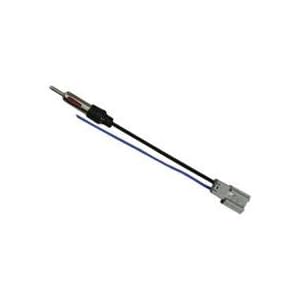
Thanks everyone for your help!
Sorry it took me a while to post an update. Apparently the antenna adapter SonicElectronix.com sent me wasn't compatible... I looked on Amazon.com and found a "Metra 40-HD11 2009-Up Honda Antenna Adapter Cable" which fit perfectly!
So problem solved!
I suppose Honda Fits with Nav units require a specific antenna adapter.
Amazon.com: Metra 40-HD11 2009-Up Honda Antenna Adapter Cable: Electronics
Thanks everyone for your help!

Thread
Thread Starter
Forum
Replies
Last Post
Hank Brandenburg
2nd Generation (GE 08-13)
9
Oct 30, 2011 11:23 AM
