


Door Trim Kits, questions,answers, photos


Member
Joined: Jun 2007
Posts: 32
From: Los Angeles, CA
I can help.
Let me know if you want me to pull some pictures off my service manual. It isn't super tricky but there are things to watch out for.
I wanted to give a quick shout out to a dealer that's doing some pretty cool promoting, podcast installation videos.
Here is the one for the door trim from College Hills Honda.
Podcast Episode #11 - Honda Fit Interior Trim Kit Installation
I wanted to give a quick shout out to a dealer that's doing some pretty cool promoting, podcast installation videos.
Here is the one for the door trim from College Hills Honda.
Podcast Episode #11 - Honda Fit Interior Trim Kit Installation
Last edited by stephanpark; Jun 13, 2007 at 12:15 PM.


Member
Joined: May 2007
Posts: 131
From: Altadena, CA
Eric

Member

Joined: Oct 2006
Posts: 39
From: SW OH, USA
how to remove radio cover?
Does anyone have instructions how to remove the trim around the radio and climate controls? I can see that its one piece, I can only find one screw (below the climate knobs), and I removed the knobs, but it still isnt even trying to loosen up anywhere. Anyone have a clue how to remove this piece? I am trying to take it off to paint it BOM, so I dont want to mess it up taking it off. Thanks for any help!


Member
Joined: Jun 2007
Posts: 32
From: Los Angeles, CA
wrkoutgrl1, don't know if you've already done this, but removing that housing is fairly drawn out because although the pieces look like separate parts, it is actually one huge plastic nacelle. But I have yet to do this myself so you might be able to separate a front panel if any from behind once you take the nacelle out.
I'll try to copy my 2005 Manual as best I can hope it still applies to your model. These instructions will be focused on left hand drive models but basically right hand drivers are mirrored in instruction.
1. Remove the inner glove box to get access to vent control lines.
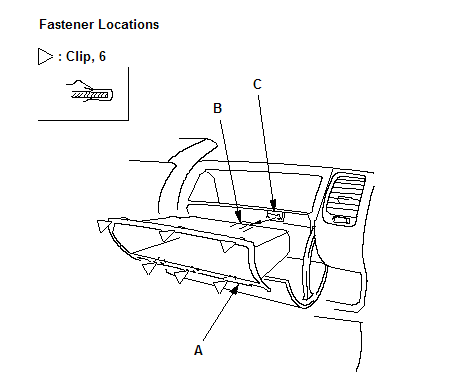
Open the glove box lid, then gently pull out the inner glove box (A) to detach the clips, then remove it.
To reinstall, insert a rib (B) on back of the box to the holder (C) of the steering hanger beam.
2. Remove passenger's side dash under cover on the right side (Driver's side shown though).

Turn the lock knob (B) 90°. Gently pull down the rear edge to release the clip. Pull the cover away to release it from the clip (C) on the body and to release its pin (D) from the kick panel (E).
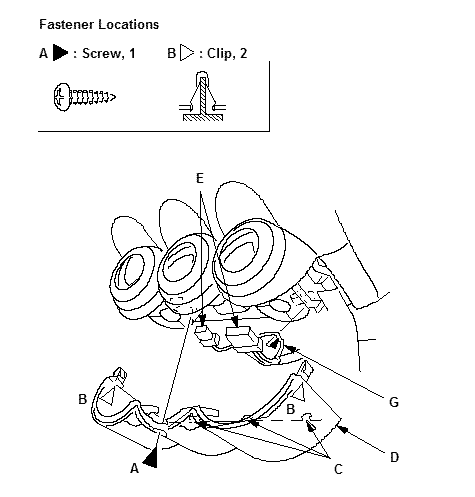
3. Remove the screw (A). Detach the clips (B) and release the hooks (C) by pulling the center lower cover (D) down, by hand.
Disconnect the heater control unit connectors (E) or climate control unit connector, and release the unit harness (G) from the clamp.
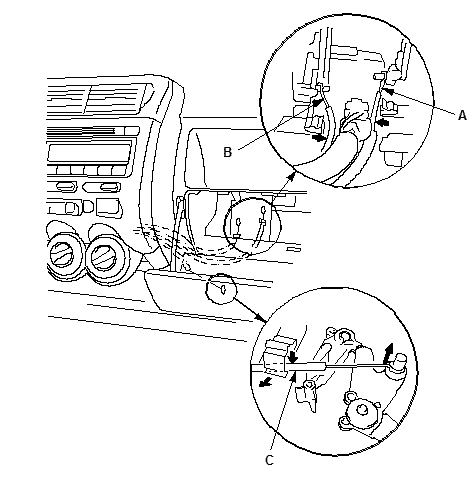
4. In the inner glove box opening, disconnect the recirculation control cable (A) and the mode control cable (B), and from under the dashboard, disconnect the air mix control cable (C). Take care not to bend any cables.
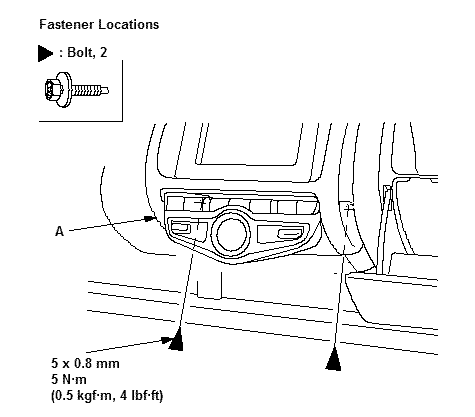
5. From the glove box and driver's dashboard lower cover openings, loosen the bolts securing the center panel (A). (note: Illustration shows Automatic AC unit but bolts are in same location)
6. Using a wrench, carefully insert a wrench from the inner glove box opening, and push a panel clip on the glove box side from back of the center panel (A) to release it.
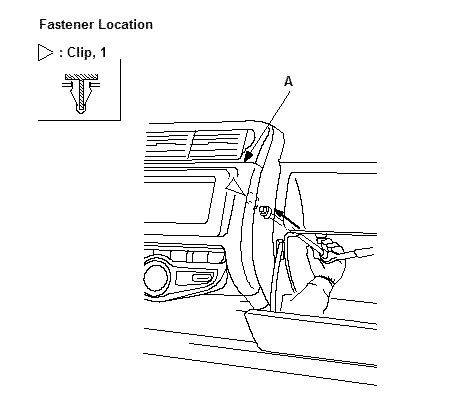
7. Pull out the center panel (A) to release the clips (B, C), and disconnect the connectors. Heater control switch connector (D) and rear deffoger switch connector (E) then, Audio unit connectors (F) and antenna lead (G).
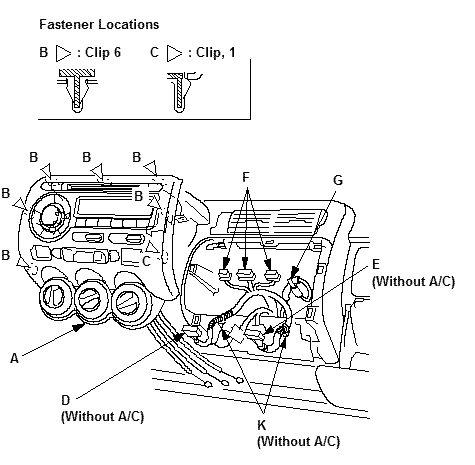
8. Detach the harness clips (K) from both center panel brackets, then remove the center panel. Take care not to bend any cables.
9. Install the panel in the reverse order of removal, and make sure each connector is plugged in properly, and antenna lead and cables are connected properly.
- - -
Hope this is helpful. Since I needed to do this for my iPod integration installation anyway, I'll just cut and pasted there so no sweat. Good luck.
[legal boiler plate here ]
I'll try to copy my 2005 Manual as best I can hope it still applies to your model. These instructions will be focused on left hand drive models but basically right hand drivers are mirrored in instruction.
1. Remove the inner glove box to get access to vent control lines.
Open the glove box lid, then gently pull out the inner glove box (A) to detach the clips, then remove it.
To reinstall, insert a rib (B) on back of the box to the holder (C) of the steering hanger beam.
2. Remove passenger's side dash under cover on the right side (Driver's side shown though).
Turn the lock knob (B) 90°. Gently pull down the rear edge to release the clip. Pull the cover away to release it from the clip (C) on the body and to release its pin (D) from the kick panel (E).
3. Remove the screw (A). Detach the clips (B) and release the hooks (C) by pulling the center lower cover (D) down, by hand.
Disconnect the heater control unit connectors (E) or climate control unit connector, and release the unit harness (G) from the clamp.
4. In the inner glove box opening, disconnect the recirculation control cable (A) and the mode control cable (B), and from under the dashboard, disconnect the air mix control cable (C). Take care not to bend any cables.
5. From the glove box and driver's dashboard lower cover openings, loosen the bolts securing the center panel (A). (note: Illustration shows Automatic AC unit but bolts are in same location)
6. Using a wrench, carefully insert a wrench from the inner glove box opening, and push a panel clip on the glove box side from back of the center panel (A) to release it.
7. Pull out the center panel (A) to release the clips (B, C), and disconnect the connectors. Heater control switch connector (D) and rear deffoger switch connector (E) then, Audio unit connectors (F) and antenna lead (G).
8. Detach the harness clips (K) from both center panel brackets, then remove the center panel. Take care not to bend any cables.
9. Install the panel in the reverse order of removal, and make sure each connector is plugged in properly, and antenna lead and cables are connected properly.
- - -
Hope this is helpful. Since I needed to do this for my iPod integration installation anyway, I'll just cut and pasted there so no sweat. Good luck.
[legal boiler plate here
]
Last edited by stephanpark; Nov 26, 2007 at 09:14 AM.
Sorry if I brought this dead thread back to life, but...
edash sells a 49 piece kit for a few bucks less.
- Full Kit, 49 Pcs. #HAFT07B
edash sells a 49 piece kit for a few bucks less.
- Full Kit, 49 Pcs. #HAFT07B
I haven't ordered from these guys... yet. But they have an awesome trim kit available in just about any finish/material you want including different colors of real carbon fiber and also a real brushed aluminum option.
About $300 for a 48-piece REAL carbon fiber dash trim kit, but it's got just about everything in it.
They also offer exterior pieces for the pillars.
Honda Dash Kits, Wood Dash Kits, Trim Dash Kits, Wood Grain Dash Kit, Carbon Fiber Dash Kit, Molded Dash Kits
About $300 for a 48-piece REAL carbon fiber dash trim kit, but it's got just about everything in it.
They also offer exterior pieces for the pillars.
Honda Dash Kits, Wood Dash Kits, Trim Dash Kits, Wood Grain Dash Kit, Carbon Fiber Dash Kit, Molded Dash Kits

Member
Joined: Jul 2008
Posts: 192
From: Perryville, MO
Sorry if I brought this dead thread back to life, but...
edash sells a 49 piece kit for a few bucks less.
- Full Kit, 49 Pcs. #HAFT07B
edash sells a 49 piece kit for a few bucks less.
- Full Kit, 49 Pcs. #HAFT07B

these kits are all made by only a couple of manufactures which i have used just about all of them and the quality is great they use real CF and wood if you wanted wood ease is ok just timely and once stuck its on there and trying to get if off will mess it up.

Banned
Joined: Jan 2009
Posts: 97
From: never never land
u could of typed less and got an accurate online conversion rate (it does fluctuate throughout the day)

Member
Joined: Apr 2007
Posts: 393
From: SGV, CA

I got the JDM chrome door handles, but I just got a Zeta wood trim kit that I painted white. Im still on the line about them (of making the car interior too buzy or not), and want to see what fitfreakers think. Haha, the gauge meter trim, is still curing though so I dont have a pic of that or a full pic of the car interior yet.


Whatdyou think? Yes or No? Buzy or Clean? I'm planning to get window switch covers to pull it in and not look so out of place. Or I might just rock only the meter switch when its done. Thanks input appreciated. (I also just wanted to post something cuz of the work done and my, me not being so happy lol)
Whatdyou think? Yes or No? Buzy or Clean? I'm planning to get window switch covers to pull it in and not look so out of place. Or I might just rock only the meter switch when its done. Thanks input appreciated. (I also just wanted to post something cuz of the work done and my, me not being so happy lol)
i LOVE it! Did u follow my DIY on the other thread? I did the same thing, i ordered the zeta wood trim kit and sanded it down and painted it VBP. I think it looks real good. It's not too much white, but it makes it stand out. Now all u need is the window switch trim and the ring around the shifter(MT) or shifter selector column (AT) and u'd be done.
Member
Joined: Apr 2007
Posts: 393
From: SGV, CA
i LOVE it! Did u follow my DIY on the other thread? I did the same thing, i ordered the zeta wood trim kit and sanded it down and painted it VBP. I think it looks real good. It's not too much white, but it makes it stand out. Now all u need is the window switch trim and the ring around the shifter(MT) or shifter selector column (AT) and u'd be done.
Yup sanded it down lightly, plastic primer, then 4 coats of white. Didnt clear coat, because I was thinking it would be easier to change if I dont like it without clear coat. It has a nice shine to it already though. For the window switch trim, I think Ima go get some white vinyl wrap to adhease on that part cuz I dont wanna spend 50$ on plastic, or repaint my original window switch. Do you buy a ring around the MT shifter, or paint the stock ring? Hopefully everything ties in with the window switch.

Member
Joined: May 2009
Posts: 71
From: New Berlin,WI
i had a kit off ebay, but it was really low quality ABS from china.
I ended up taking OEM factory panels and painting them purple to match my BBP fit.
already got purple illumination inside and i have a lighted keyring on the way from kev
I ended up taking OEM factory panels and painting them purple to match my BBP fit.
already got purple illumination inside and i have a lighted keyring on the way from kev

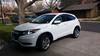
color carbon fiber dash trim photos?
Does anyone have photos of carbon fiber dash trim you have installed in colors other than the oem style? Particularly interested in dark blue or the blue and black carbon fiber.
thanks
thanks
 bump- anyone else with some recent photos?


Thread
Thread Starter
Forum
Replies
Last Post
gfrobe
1st Generation (GD 01-08)
1
Nov 13, 2016 08:43 AM
HondaPartWorld
FIT Vendor General Discussion Area
0
Nov 21, 2012 10:27 AM
fishstick
Fit Exterior Modifications & JDM Styling
4
Apr 11, 2006 11:17 PM
