


USB connected iPod/iPhone needs "Headpeice"?


Thread Starter
|
Member
Joined: Aug 2009
Posts: 38
From: USA
 USB connected iPod/iPhone needs "Headpeice"?
I have searched here and can't find an answer... Perhaps you guys can help! I heard that you need to use a 'headpeice' to control an iPod or iPhone that is hooked up tot he USB jack in your Fit Sport. Anyone have experience with this? What is it and how does it work?
Many thanks!
Many thanks!

Member
Joined: Jul 2009
Posts: 107
From: Northern VA, USA
Mine seems to be controlling the entire iPod just fine, does yours NOT do this? All I did was connect the standard USB cable that comes with an iPod and everything was there....

Member
Joined: Sep 2008
Posts: 357
From: Tucson, Az

Is it the iPod Touch or regular iPod? If its an iTouch, I figured out how to get rid of the "accessory connected" so that you can scroll the playlist from the iPod Touch instead from the stereo.
Most iTouch you can't scroll from the player only from the stereo once connected.
Most iTouch you can't scroll from the player only from the stereo once connected.
Thread Starter
|
Member
Joined: Aug 2009
Posts: 38
From: USA
I am just trying to get a sense of how I would use the USB jack to play music. Seems like I could either hook up my first generation iPhone or a flash stick with a bunch of MP3s on it.
What I don't knwo is what happens after that. With either of those options can you use the stearing wheel controls to skips songs and/or scroll through your songs? Can you use the radio console? Does the voice command system witht hte nab also control the radio like it does in our Honda Odessey?
BTW: Is there a owners manual PDF I could download somewhere instead of bugging everyone here? :-)
Member
Joined: Jul 2009
Posts: 107
From: Northern VA, USA
Thanks for the help! I am looking at buying a 2009 Fit Sport with Nav. I haven't been able to get back to the dealership yet so I have been reading this forum a lot. (Great info, btw!)
I am just trying to get a sense of how I would use the USB jack to play music. Seems like I could either hook up my first generation iPhone or a flash stick with a bunch of MP3s on it.
What I don't knwo is what happens after that. With either of those options can you use the stearing wheel controls to skips songs and/or scroll through your songs? Can you use the radio console? Does the voice command system witht hte nab also control the radio like it does in our Honda Odessey?
BTW: Is there a owners manual PDF I could download somewhere instead of bugging everyone here? :-)
I am just trying to get a sense of how I would use the USB jack to play music. Seems like I could either hook up my first generation iPhone or a flash stick with a bunch of MP3s on it.
What I don't knwo is what happens after that. With either of those options can you use the stearing wheel controls to skips songs and/or scroll through your songs? Can you use the radio console? Does the voice command system witht hte nab also control the radio like it does in our Honda Odessey?
BTW: Is there a owners manual PDF I could download somewhere instead of bugging everyone here? :-)
Thread Starter
|
Member
Joined: Aug 2009
Posts: 38
From: USA
I had a brilliant idea and went to the hoda site to see if they had pics of this thing in action. Lo and behold, they did:
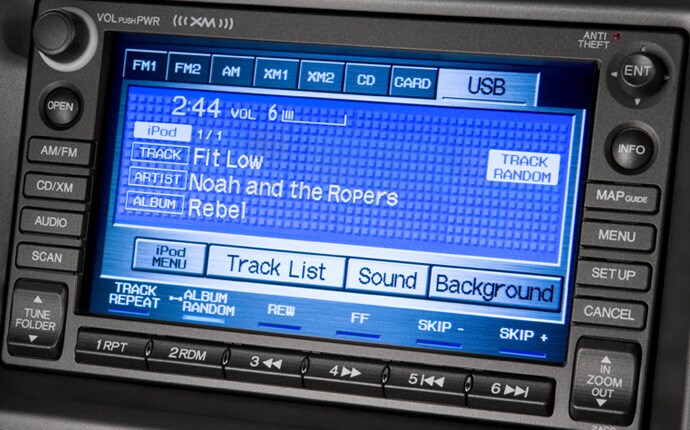
The readout depicted above includes an indication that it is hooked up to an iPod. Looks snazzy! Now, how does the control work? Can you scroll through songs quickly? Can you scroll witht he steering wheel controls? thanks!
The readout depicted above includes an indication that it is hooked up to an iPod. Looks snazzy! Now, how does the control work? Can you scroll through songs quickly? Can you scroll witht he steering wheel controls? thanks!

I have the navigation unit, and an ipod, so I can probably answer your questions  .
.
The system is really best used with playlists. You can scroll through all the songs on the ipod, but there's only 10 on screen at once, and the scrolling is slooooow. There's no way to search the ipod either. It would probably be fine if you only had a couple hundred songs, but if you have thousands, it kind of sucks.
From the steering wheel, you can go to the next and previous tracks. I actually haven't tried scrolling, but I don't think that's something you'd want to do while driving anyway. (I'm guessing it wouldn't scroll from the steering wheel controls actually.)
The voice control does not work with the USB input, sadly (well, you can switch to it by voice, but you can't do anything else).
If there's anything else you want to know, let me know.
.The system is really best used with playlists. You can scroll through all the songs on the ipod, but there's only 10 on screen at once, and the scrolling is slooooow. There's no way to search the ipod either. It would probably be fine if you only had a couple hundred songs, but if you have thousands, it kind of sucks.
From the steering wheel, you can go to the next and previous tracks. I actually haven't tried scrolling, but I don't think that's something you'd want to do while driving anyway. (I'm guessing it wouldn't scroll from the steering wheel controls actually.)
The voice control does not work with the USB input, sadly (well, you can switch to it by voice, but you can't do anything else).
If there's anything else you want to know, let me know.
Thread Starter
|
Member
Joined: Aug 2009
Posts: 38
From: USA
Thanks so much! Have you tried a USB flash drive, by chance? If so, does it recognize just mp3's or does it use other media as well? Also, does it recognize sub-folders on a flash drive? I, too, have thousands of songs and am worried about 1) the hassle of having to plug and unplug my phone in the globe box every time I drive and 2) the risk of forgetting my phone and leaving it in the car. I was thinking that I would buy a big flash memory syick an dump 10,000 songs on it and just leave it in there.
Member
Joined: Jul 2009
Posts: 107
From: Northern VA, USA
The flash stick is a pretty good idea, it won't recognize folders though. You get pretty good about remembering to connect and disconnect your device, I surely have in the past two weeks. If its a USB drive, according to the manual, it won't play any songs that have DRM, so anything off the iTunes store will only work on an Apple device that does the decoding for the radio to use it. You could always just pick up a secondhand iPod off eBay to keep in the car. Just beware that the heat of the car may shorten its life. I take my iPod outta the car with me every day because of that!
I haven't had a chance to try a USB flash drive yet; I'll give it a shot when I go home tonight.
You might get some benefit from taking a look at the manual. (The normal manual talks about using USB flash drives... the manual for the navigation system doesn't talk about it at all.) According to the manual folders should work, though I don't know how many levels of folders it will support. The system says it'll work with MP3, WMA, and AAC files.
While what nerual13 said about DRM is true, all songs on the iTunes store are now DRM-free.
I actually think a better alternative to a USB flash drive is a PCMCIA compact flash card adapter and a compact flash card. The navigation unit has a slot behind the screen, and voice commands work with the PC card input... though I have yet to try this myself.
I don't know if you can set up playlists with either the USB flash drive or the PC Card input. I love the smart playlists on my ipod.
You might get some benefit from taking a look at the manual. (The normal manual talks about using USB flash drives... the manual for the navigation system doesn't talk about it at all.) According to the manual folders should work, though I don't know how many levels of folders it will support. The system says it'll work with MP3, WMA, and AAC files.
While what nerual13 said about DRM is true, all songs on the iTunes store are now DRM-free
.I actually think a better alternative to a USB flash drive is a PCMCIA compact flash card adapter and a compact flash card. The navigation unit has a slot behind the screen, and voice commands work with the PC card input... though I have yet to try this myself.
I don't know if you can set up playlists with either the USB flash drive or the PC Card input. I love the smart playlists on my ipod
.
Member
Joined: Jul 2009
Posts: 107
From: Northern VA, USA
all songs NOW are DRM free, but previous purchases may not be Just wanted to remind...That's what keeps me from running a USB drive, I've got a ton of music that wouldn't work at all, and I'm not paying to upgrade!
Just wanted to remind...That's what keeps me from running a USB drive, I've got a ton of music that wouldn't work at all, and I'm not paying to upgrade!
nerual13: you're right, I guess I should have emphasized the now more  .
.
I tried a USB flash drive, and it works with folders (though I only tried one level deep). I only tried mp3s though, but I assume unprotected AAC would work fine too.
I actually ordered a PCMCIA compact flash adapter today, so we'll see how that works. (Some strange limitations though, like a max of 999 songs for the PC card, which is rather low... but I guess that's more than a 4gb card would hold anyway.)
.I tried a USB flash drive, and it works with folders (though I only tried one level deep). I only tried mp3s though, but I assume unprotected AAC would work fine too.
I actually ordered a PCMCIA compact flash adapter today, so we'll see how that works
. (Some strange limitations though, like a max of 999 songs for the PC card, which is rather low... but I guess that's more than a 4gb card would hold anyway.)
Thread Starter
|
Member
Joined: Aug 2009
Posts: 38
From: USA
I took my iPhone and USB drive to the dealer today. Anticipating issues with folders on the USB stick, I created about 10 folders in 2 levels with songs scattered throughout. The interface was easy to figure out without using the manual and it found all my songs. You can play random through all folders, no matter the level, or you can go into a folder and play songs from that folder only. Very very nice since all I really want to do is dump about 15000 sings on a drive and leave it on random!
A few observations:
1) With both iPhone and USB stick, if you do anything that stops the music from playing (Go to a different source for the stereo, turn the stereo off, turn the car off, etc) and then come back to that sources again, the music starts playing again right where it left off.
2) When your iPhone has other system sounds like the "you've got email" chime, it appears to send that sound through the speakers. I definitely got the "you've got mail chime" while I was driving, but I didn't receive a call. However, if this works like all other appliances that connect tot he iPhone, you will get ALL iPhone sounds on the stereo.
3) It defaults to the ALL SONGS selector when you plug in your iPhone, but you can go to the normal iPhone menu with the press of a button. It handles playlists and all that jazz perfectly.
w00t!
A few observations:
1) With both iPhone and USB stick, if you do anything that stops the music from playing (Go to a different source for the stereo, turn the stereo off, turn the car off, etc) and then come back to that sources again, the music starts playing again right where it left off.
2) When your iPhone has other system sounds like the "you've got email" chime, it appears to send that sound through the speakers. I definitely got the "you've got mail chime" while I was driving, but I didn't receive a call. However, if this works like all other appliances that connect tot he iPhone, you will get ALL iPhone sounds on the stereo.
3) It defaults to the ALL SONGS selector when you plug in your iPhone, but you can go to the normal iPhone menu with the press of a button. It handles playlists and all that jazz perfectly.
w00t!
.But if you weren't playing anything, then it'll default to all songs (just like if you hit play on an ipod without picking a playlist or a song).
Member
Joined: Jul 2009
Posts: 107
From: Northern VA, USA
I took my iPhone and USB drive to the dealer today. Anticipating issues with folders on the USB stick, I created about 10 folders in 2 levels with songs scattered throughout. The interface was easy to figure out without using the manual and it found all my songs. You can play random through all folders, no matter the level, or you can go into a folder and play songs from that folder only. Very very nice since all I really want to do is dump about 15000 sings on a drive and leave it on random!
A few observations:
1) With both iPhone and USB stick, if you do anything that stops the music from playing (Go to a different source for the stereo, turn the stereo off, turn the car off, etc) and then come back to that sources again, the music starts playing again right where it left off.
2) When your iPhone has other system sounds like the "you've got email" chime, it appears to send that sound through the speakers. I definitely got the "you've got mail chime" while I was driving, but I didn't receive a call. However, if this works like all other appliances that connect tot he iPhone, you will get ALL iPhone sounds on the stereo.
3) It defaults to the ALL SONGS selector when you plug in your iPhone, but you can go to the normal iPhone menu with the press of a button. It handles playlists and all that jazz perfectly.
w00t!
A few observations:
1) With both iPhone and USB stick, if you do anything that stops the music from playing (Go to a different source for the stereo, turn the stereo off, turn the car off, etc) and then come back to that sources again, the music starts playing again right where it left off.
2) When your iPhone has other system sounds like the "you've got email" chime, it appears to send that sound through the speakers. I definitely got the "you've got mail chime" while I was driving, but I didn't receive a call. However, if this works like all other appliances that connect tot he iPhone, you will get ALL iPhone sounds on the stereo.
3) It defaults to the ALL SONGS selector when you plug in your iPhone, but you can go to the normal iPhone menu with the press of a button. It handles playlists and all that jazz perfectly.
w00t!

Thread
Thread Starter
Forum
Replies
Last Post
