Navigation Reviews - Should I get it?


Member
Joined: Apr 2010
Posts: 1,302
From: Louisville
Old enough not to trust batteries (especially rechargeable ones) or data connections, at least for critical stuff. Its why I got a separate ipod for the car, for example. Its tucked away and does its own thing (store and play music) so I don't have to worry about my iphone running out of juice in the process of getting to my destination. That said, I'll admit this is mostly about personal preference as anything.
 and the droid dock is powered.
Thread Starter
|
New Member
Joined: Nov 2012
Posts: 4
From: San Francisco
Thanks everyone for the opinions, this was definitely helpful. Saving money is not a big concern for me, but I also don't want to be ripped off by paying more for a subpar nav unit just because it's OEM.
Like a couple people said earlier, I also place a high value on in-dash navi units, probably because I'm so used to them from my existing car, so it sounds like the aftermarket in-dash navigation is probably the way to go. Anyone have any recommendations for a good receiver?
Like a couple people said earlier, I also place a high value on in-dash navi units, probably because I'm so used to them from my existing car, so it sounds like the aftermarket in-dash navigation is probably the way to go. Anyone have any recommendations for a good receiver?

Member

Joined: Aug 2009
Posts: 2,462
From: Vermont
Clarion, Pioneer, & Kenwood make some really good Head units but I think you'll want to go through all of them to see what Features are available. Then figure out which features are most important (ipod navigation, Ease of Navi location input, etc...) then read up on the reviews surrounding those particular items.
Also consider, if the new fit has steering wheel volume controls, make sure you get the PAC SWI (steering wheel interface) so you retain steering controls.
~SB
Also consider, if the new fit has steering wheel volume controls, make sure you get the PAC SWI (steering wheel interface) so you retain steering controls.
~SB

Member
Joined: Dec 2009
Posts: 26
From: pa
Our 09 Sport has Nav. It was the last 09 on the lot and just happened to be so equipped. It works about as well as our relatively new Tom-Tom. I do like the system being integrated into the stock stereo system. It is a little easier to hear and understand.

Member
Joined: Oct 2012
Posts: 53
From: NYC
I ordered this one last week. Will review/update once I start using it.


I ordered this one last week. Will review/update once I start using it.
Amazon.com: Belkin Bluetooth Car Hands-Free Kit for Apple iPod, Apple iPhone, BlackBerry,and Android Smartphones, US Version: Electronics
Amazon.com: Belkin Bluetooth Car Hands-Free Kit for Apple iPod, Apple iPhone, BlackBerry,and Android Smartphones, US Version: Electronics
Member
Joined: Aug 2009
Posts: 2,462
From: Vermont
The downside is that if you are using the ipod in the upper glove box, it won't override when a call comes in and you have to adjust the Aux input & volume manually.
~SB
I have the exact same one and i works great. I have the microphone/push button down resting under the parking brake (haven't found a good place to permanently attach it) and it works great for phone calls and audio. Maybe you got a bad one or you need to unpair/repair your phone. (I have a Droid X2 running Android 2.3.5 (Eclipse 2.2 Rom) - worked fine on the Stock Crap Verizon Rom as well)
The downside is that if you are using the ipod in the upper glove box, it won't override when a call comes in and you have to adjust the Aux input & volume manually.
~SB
The downside is that if you are using the ipod in the upper glove box, it won't override when a call comes in and you have to adjust the Aux input & volume manually.
~SB
People say I sound perfectly fine if the car isn't moving, so I suspect some overly aggressive noise cancellation.
Member
Joined: Oct 2012
Posts: 53
From: NYC
People say I sound perfectly fine if the car isn't moving, so I suspect some overly aggressive noise cancellation.
Member
Joined: Aug 2009
Posts: 2,462
From: Vermont
~SB
Member
Joined: Oct 2012
Posts: 53
From: NYC
I received it yesterday. Even I've a problem where person on other end thinks my voice is muffled. I tried it by placing microphone next to fan speed knob and center console near hand brake. Best place was an area between steering wheel and gauges. I will test it for couple of days and return it if doesn't serve its purpose. Music sounds great though.....

New Member
Joined: May 2010
Posts: 14
From: Downey,CA
I received it yesterday. Even I've a problem where person on other end thinks my voice is muffled. I tried it by placing microphone next to fan speed knob and center console near hand brake. Best place was an area between steering wheel and gauges. I will test it for couple of days and return it if doesn't serve its purpose. Music sounds great though.....

Member
Joined: Nov 2010
Posts: 1,500
From: New York

Stand-alone GPS with real-time traffic is what I'd get if I didn't already own a GPS. Seems to receive okay in the front center cupholder and that's right next to the power port. My Android phone isn't loud enough.

Member
Joined: Oct 2012
Posts: 72
From: Ski country somewhere south of Buffalo, NY
I'm very happy with my Garmin Nuvi that sits on the dash. Plus I doubt that I could take the in dash unit into the house to transfer a route from my Microsoft Streets and Trips. Maybe I could take Streets and Trips out to the car, but can I hoop it up to make the transfer? Na, I keep the Garmin.


For FM most major radio stations broadcast over the net so you could use Internet radio app or you could load all your music onto Google play and stream your entire collection ( thats what I do). When the GPS app needs to give you a direction it will lower your music volume, say the direction, and then return it to normal volume.
Edit: who listens to FM radio anymore? Thats like going to blockbuster to rent videos.
Edit: who listens to FM radio anymore? Thats like going to blockbuster to rent videos.
Member
Joined: Nov 2010
Posts: 1,500
From: New York
For me, AM radio for news/traffic, or MP3 player/CD player for music. No interest in music radio, internet or otherwise, nor in using phone bandwidth for that, nor in dealing with something as small to maneuver as a phone to listen to music while driving.
If you install a Bluetooth modual you can change it with the steering wheel. I personally have no problem changing the song on my phone (4.3 inch screen)
Thread Starter
|
New Member
Joined: Nov 2012
Posts: 4
From: San Francisco
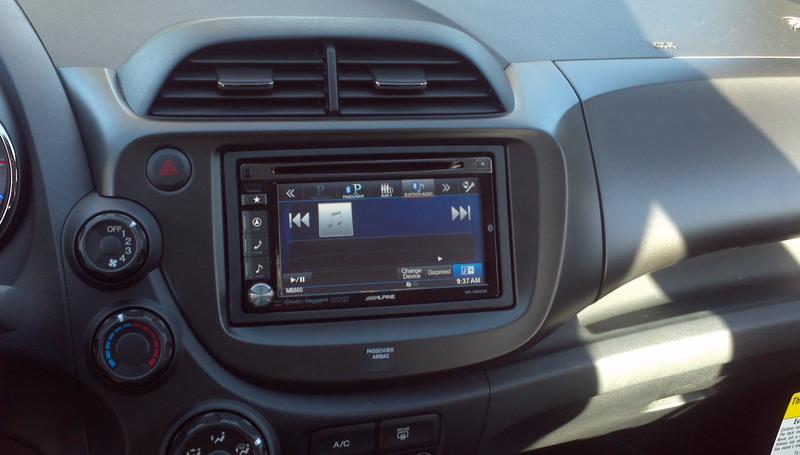
Just thought I'd post an update here, since I did end up getting a 2013 Fit Sport without navigation. Brought my car to a local shop and had them put in an aftermarket Alpine unit (I'm not a DIYer), and I'm all set! Very easy, and ended up being about $1K cheaper than getting the Sport Navi. Pic below, although I used my phone to take it so apologies for the blurriness.