Enable Locking Beep?


Enable Locking Beep?
Hey All,
Not sure how I did it but I disabled the lock beep on my 2015.
It beeps at me when I use the handle unlock, but not when I lock it.
Anyone know the secret code for that?
Thanks in advance
P.S. My apologies if this has been asked. I couldn't find it when I searched.
Not sure how I did it but I disabled the lock beep on my 2015.
It beeps at me when I use the handle unlock, but not when I lock it.
Anyone know the secret code for that?
Thanks in advance
P.S. My apologies if this has been asked. I couldn't find it when I searched.

Member
Joined: Jun 2016
Posts: 948
From: Foothills of the Smokies, east Tennessee

Dunno if this helps or not, found it Googling...have not tried it to verify if it might work, my wife is out and about in the car atm...
"Q: How do you silence the horn beep feature when using the remote? asked by Jessica N on December 14, 2015
How do you silence the horn beep feature when using the remote?
A: Your car is set by default to honk the horn...
Your car is set by default to honk the horn when you lock your doors with the remote. However, you can change this if you prefer. Here’s what you need to do:
Turning off this feature does not affect panic alarm function or security system function."
"Q: How do you silence the horn beep feature when using the remote? asked by Jessica N on December 14, 2015
How do you silence the horn beep feature when using the remote?
A: Your car is set by default to honk the horn...
Your car is set by default to honk the horn when you lock your doors with the remote. However, you can change this if you prefer. Here’s what you need to do:
- Press both the lock and unlock buttons on your remote for two seconds.
- Watch for the hazard lights to flash three times.
- Lock the doors and confirm that the horn does not sound.
- Press and hold both the lock and unlock buttons on the remote for at least two seconds.
- Watch for the hazard lights to flash once. The horn should honk one time.
Turning off this feature does not affect panic alarm function or security system function."
Last edited by Fuelish; Feb 26, 2017 at 01:51 PM.
Dunno if this helps or not, found it Googling...have not tried it to verify if it might work, my wife is out and about in the car atm...
"Q: How do you silence the horn beep feature when using the remote? asked by Jessica N on December 14, 2015
How do you silence the horn beep feature when using the remote?
A: Your car is set by default to honk the horn...
Your car is set by default to honk the horn when you lock your doors with the remote. However, you can change this if you prefer. Here’s what you need to do:
Turning off this feature does not affect panic alarm function or security system function."
"Q: How do you silence the horn beep feature when using the remote? asked by Jessica N on December 14, 2015
How do you silence the horn beep feature when using the remote?
A: Your car is set by default to honk the horn...
Your car is set by default to honk the horn when you lock your doors with the remote. However, you can change this if you prefer. Here’s what you need to do:
- Press both the lock and unlock buttons on your remote for two seconds.
- Watch for the hazard lights to flash three times.
- Lock the doors and confirm that the horn does not sound.
- Press and hold both the lock and unlock buttons on the remote for at least two seconds.
- Watch for the hazard lights to flash once. The horn should honk one time.
Turning off this feature does not affect panic alarm function or security system function."

Yes. Doesn't beep at all when locking it.

Member
Joined: Jan 2015
Posts: 543
From: metro chicago
So all the doors lock physically and you can hear the mechanism engage, you just don't get the beep when you fob it twice in succession. Did you try opening and closing all the doors plus the hood and hatch, esp. the hatch? Now that I think about it, this has happened to me a few times, usually in humid weather, and I had to open and close the hatch.
So all the doors lock physically and you can hear the mechanism engage, you just don't get the beep when you fob it twice in succession. Did you try opening and closing all the doors plus the hood and hatch, esp. the hatch? Now that I think about it, this has happened to me a few times, usually in humid weather, and I had to open and close the hatch.

Member
Joined: Apr 2009
Posts: 2,421
From: Upstate New York
My '15 has never "beeped" when locking the car with the fob. The lights flash, but no beep unless the doors are already locked. If I press the lock button while the doors are locked I get a "beep" which tells me "I'm already locked, dummy!" You mean this isn't the way it's supposed to work?
My '15 has never "beeped" when locking the car with the fob. The lights flash, but no beep unless the doors are already locked. If I press the lock button while the doors are locked I get a "beep" which tells me "I'm already locked, dummy!" You mean this isn't the way it's supposed to work?
Member
Joined: Apr 2009
Posts: 2,421
From: Upstate New York
That probably is how its supposed to work, but; regardless... It's not. There's got to be a way to engage and disengage the beep. I know the unit isn't broken because it's beeping when I open the door... But since I spend a lot of time in noisy areas I'd like the lights to flash and the car to beep when I hit the button from afar to make sure it's locked.
Mine doesn't beep when I use the fob to unlock, only when I use the handle/hatch release, but it definitely blinks.

Member
Joined: Aug 2008
Posts: 1,443
From: Dunedin, Florida
We're talking beep, not horn, right?
I'll likely call my dealership in the morning to see if they can coach me over the phone. It's under warranty so I'm optimistic... I just don't want to have to bring it in.
I'll report my findings.
I forgot to report back...
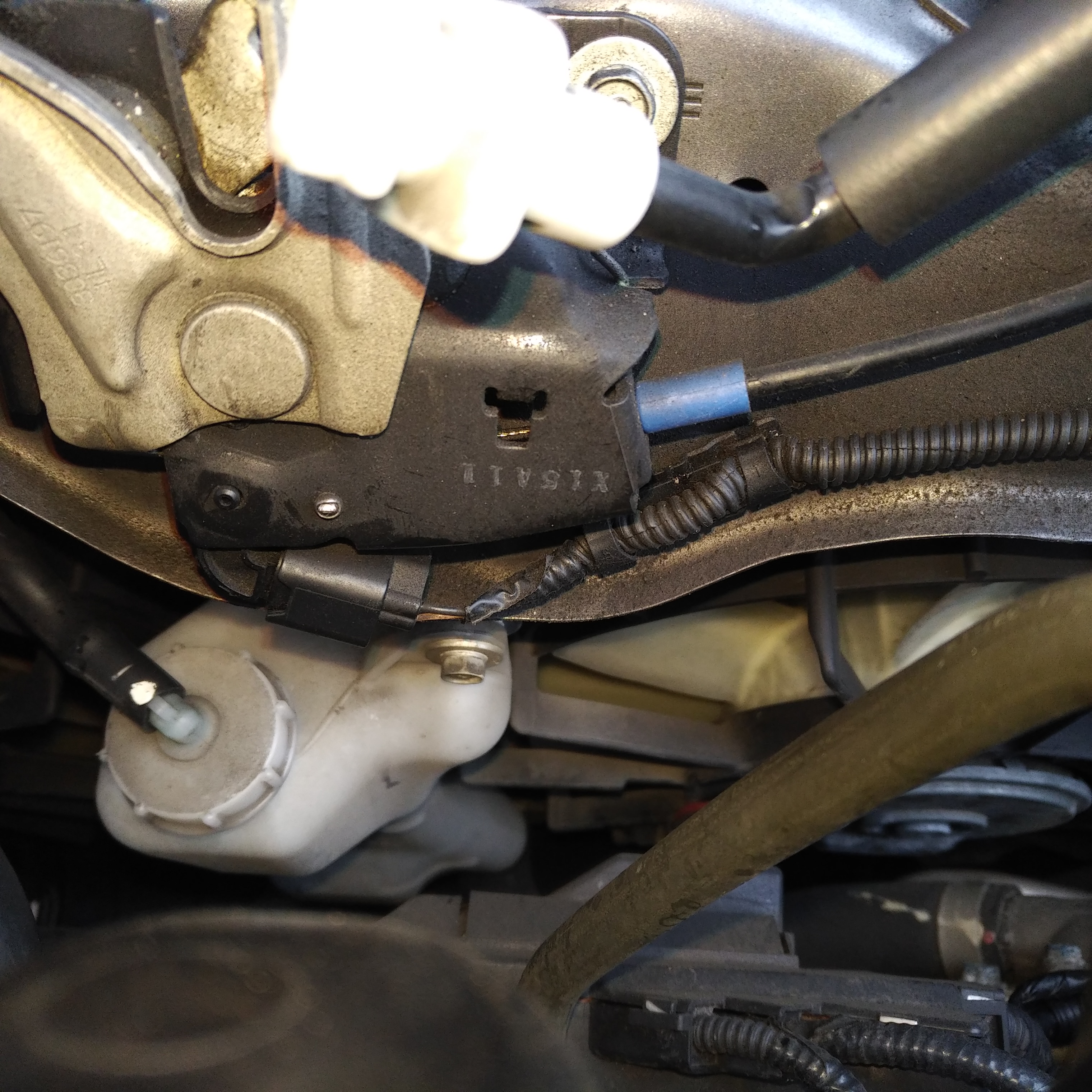
There's a connector under the hood, attached to the latch, that slipped out of place, so it totally disabled the alarm system. It was oxidized as hell, so it's obviously been disconnected a while, but I took a wire brush to it and now I'm good to go...... $120 in diagnostics later (since it wasn't an actual mechanical issue) and being told "We couldn't get it back in because, it seems like, there's something jammed in there."
There's a connector under the hood, attached to the latch, that slipped out of place, so it totally disabled the alarm system. It was oxidized as hell, so it's obviously been disconnected a while, but I took a wire brush to it and now I'm good to go...... $120 in diagnostics later (since it wasn't an actual mechanical issue) and being told "We couldn't get it back in because, it seems like, there's something jammed in there."

I forgot to report back...
There's a connector under the hood, attached to the latch, that slipped out of place, so it totally disabled the alarm system. It was oxidized as hell, so it's obviously been disconnected a while, but I took a wire brush to it and now I'm good to go...... $120 in diagnostics later (since it wasn't an actual mechanical issue) and being told "We couldn't get it back in because, it seems like, there's something jammed in there."
There's a connector under the hood, attached to the latch, that slipped out of place, so it totally disabled the alarm system. It was oxidized as hell, so it's obviously been disconnected a while, but I took a wire brush to it and now I'm good to go...... $120 in diagnostics later (since it wasn't an actual mechanical issue) and being told "We couldn't get it back in because, it seems like, there's something jammed in there."
Got a picture of this connector?