


Tablet Mounting


Thread Starter
|
New Member
Joined: Jul 2012
Posts: 13
From: Charlotte, NC United States
Tablet Mounting
Hope everyone is doing well today!
I ordered a few toys last night including:
$0.80 - really?! - I bought 2
3.5mm Male to Male Slim-Plug Shielded Audio Cable 1 ft. 240-051
CLOSEOUT! - I bought 4 - because they were so CHEAP!
Belkin AC/DC Universal USB Charging Kit for Samsung and more 139-014
On backorder until late April - bought 2 because again - they were cheap.
Dual-Port USB Car Charger Adapter for Apple iPhone iPad iPod 125-362
MHL Adapter USB Micro B to HDMI with Power/Charging Input 180-698
The MHL plug was ordered on a whim - and I found out a bit too late that I would need a 5 to 11 pin adapter:
Newegg.com - 5 to 11 pin
If I decided to go with ARLiberator and a Pioneer double DIN - I have almost everything I need. The better buying choice - in hindsight - would have been one available from New Egg. At the end of the day - if I don't go that route - I can still use the adapter on my TV at home.
And now - the tablet mount:
Car Air Vent Mount for ASUS EEE Pad MeMo, Acer Iconia A100, Samsung Galaxy Tab, Amazon Kindle Fire, HTC Flyer, Blackberry Playbook, Archos 70 and Other 7" Internet Tablets
I dug up some coupon codes saving 10% at mountguys.com and $5 off an order of $50 or more from PartsExpress
I have a rooted Galaxy IIs where I can create a wi-fi hotspot and also a Galaxy 2.7.0 tablet with 32gb of extra storage. Until the factory stereo is replaced, no bluetooth streaming is readily possible so this is the reason for the male to male headphone jack.
The MountGuys have another air vent mounting solution:
Universal Car Air Vent Swivel Mount for Tablet Computers
I wanted a more flush look so we'll see if the mount I ordered will do the trick.
Tasker and Torque are installed on the tablet and I also have an OBDII Bluetooth adapter:
I was looking at cigarette lighter sockets so I could go "3 wide" in the lower console instead of just one. In the meantime - I ordered this 'bandaid":
Cigarette Lighter Triple Socket Adapter 265-564
The existing factory plug cover throws me off so I was thinking of relocating that plug for passenger access. Possibly behind the center console and mounted low because of the rear storage cup depth. Has anyone had experience with adding more accessory sockets? In the end - I want it to look as 'factory' as possible. I might try my luck at the local pull-a-part to see if there are any goodies out there.
I did a quick keyword search and found a few have tried to go this way before. Any suggestions and comments are always appreciated!
After I get everything in I'll try to post some pix.
Dave
I ordered a few toys last night including:
$0.80 - really?! - I bought 2
3.5mm Male to Male Slim-Plug Shielded Audio Cable 1 ft. 240-051
CLOSEOUT! - I bought 4 - because they were so CHEAP!
Belkin AC/DC Universal USB Charging Kit for Samsung and more 139-014
On backorder until late April - bought 2 because again - they were cheap.
Dual-Port USB Car Charger Adapter for Apple iPhone iPad iPod 125-362
MHL Adapter USB Micro B to HDMI with Power/Charging Input 180-698
The MHL plug was ordered on a whim - and I found out a bit too late that I would need a 5 to 11 pin adapter:
Newegg.com - 5 to 11 pin
If I decided to go with ARLiberator and a Pioneer double DIN - I have almost everything I need. The better buying choice - in hindsight - would have been one available from New Egg. At the end of the day - if I don't go that route - I can still use the adapter on my TV at home.
And now - the tablet mount:
Car Air Vent Mount for ASUS EEE Pad MeMo, Acer Iconia A100, Samsung Galaxy Tab, Amazon Kindle Fire, HTC Flyer, Blackberry Playbook, Archos 70 and Other 7" Internet Tablets
I dug up some coupon codes saving 10% at mountguys.com and $5 off an order of $50 or more from PartsExpress
I have a rooted Galaxy IIs where I can create a wi-fi hotspot and also a Galaxy 2.7.0 tablet with 32gb of extra storage. Until the factory stereo is replaced, no bluetooth streaming is readily possible so this is the reason for the male to male headphone jack.
The MountGuys have another air vent mounting solution:
Universal Car Air Vent Swivel Mount for Tablet Computers
I wanted a more flush look so we'll see if the mount I ordered will do the trick.
Tasker and Torque are installed on the tablet and I also have an OBDII Bluetooth adapter:

I was looking at cigarette lighter sockets so I could go "3 wide" in the lower console instead of just one. In the meantime - I ordered this 'bandaid":
Cigarette Lighter Triple Socket Adapter 265-564
The existing factory plug cover throws me off so I was thinking of relocating that plug for passenger access. Possibly behind the center console and mounted low because of the rear storage cup depth. Has anyone had experience with adding more accessory sockets? In the end - I want it to look as 'factory' as possible. I might try my luck at the local pull-a-part to see if there are any goodies out there.
I did a quick keyword search and found a few have tried to go this way before. Any suggestions and comments are always appreciated!
After I get everything in I'll try to post some pix.
Dave
Last edited by cfella; Mar 29, 2013 at 09:45 AM.
Thread Starter
|
New Member
Joined: Jul 2012
Posts: 13
From: Charlotte, NC United States
Update - Mount Up!
Feedback appreciated!
Mount is not as stable as I would like and airflow is affected from the center vents when the mount is attached and no tablet, and also when tablet is on the mount. Of course ignition has to be on to power the devices from the 12 accessory plug.
Dave
Mount is not as stable as I would like and airflow is affected from the center vents when the mount is attached and no tablet, and also when tablet is on the mount. Of course ignition has to be on to power the devices from the 12 accessory plug.
Dave

I like the design, and especially that the tablet is going to have more functions than most head units in a screen of the same size. I personally like to jump in my car and drive though, and I know that having to plug in the AUX, power to the tablet, and the phone would get annoying and I'd personally not end up doing so. I'd imagine your probably not having the tablet sit on the dash at night, especially as you removed it from the glovebox, and that's a lot of configuration, plus as you mentioned, more cables.
However, it was certainly easier than hooking up a new headunit, your whole video was only 6 minutes and that included demo. And still, being able to play games, or remove the tablet from the mount so you can configure/set up/etc seems preferable.
As for the mount, Proclip sells one for the Galaxy S2 7.0 (Samsung Galaxy Tab 2 7.0 (GT-P3100) Tablet Holders - ProClip USA) they're quite a bit more than what you paid initially, but I had one for my phone (on the left column) and it is extremely stable.
However, it was certainly easier than hooking up a new headunit, your whole video was only 6 minutes and that included demo. And still, being able to play games, or remove the tablet from the mount so you can configure/set up/etc seems preferable.
As for the mount, Proclip sells one for the Galaxy S2 7.0 (Samsung Galaxy Tab 2 7.0 (GT-P3100) Tablet Holders - ProClip USA) they're quite a bit more than what you paid initially, but I had one for my phone (on the left column) and it is extremely stable.
Thread Starter
|
New Member
Joined: Jul 2012
Posts: 13
From: Charlotte, NC United States
Agreed on all points!
Nothing will beat that OEM-ish look of an aftermarket double-DIN. Keeping the tablet out is asking for trouble but this would be a good answer to long trips, with NAV. I looked at Pro-Clips and on the left side - it would need to be mounted Portrait and not Landscape (from my recollection).
I had someone else root my Galaxy IIs for about $100, so with the tablet (179), dual usb 12-volt charger, and auxiliary cable - I am not out of pocket that much.
The mount right now is a pretty big sticking point and I had my dremel tool out for about 20 minutes trying to notch one of the arms to straddle the center divider of the 2 air vents. A solid 3rd point of contact would make all of the difference. May have to purchase a 2nd mount and play around with that one for a while!
Thanks for the feedback!
Nothing will beat that OEM-ish look of an aftermarket double-DIN. Keeping the tablet out is asking for trouble but this would be a good answer to long trips, with NAV. I looked at Pro-Clips and on the left side - it would need to be mounted Portrait and not Landscape (from my recollection).
I had someone else root my Galaxy IIs for about $100, so with the tablet (179), dual usb 12-volt charger, and auxiliary cable - I am not out of pocket that much.
The mount right now is a pretty big sticking point and I had my dremel tool out for about 20 minutes trying to notch one of the arms to straddle the center divider of the 2 air vents. A solid 3rd point of contact would make all of the difference. May have to purchase a 2nd mount and play around with that one for a while!
Thanks for the feedback!

I'm in the same project but using different route and taking my time before mounting all together

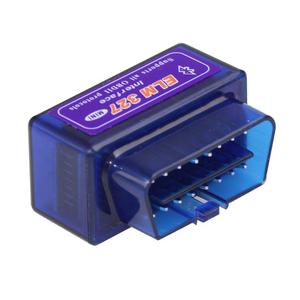

Part I Have:
Waiting to Buy:
Considering To Buy:


Part I Have:
- Super Mini ELM327
- 12V DC Step Down Converter Waterproof USB Interface 8-22V
- SCOSCHE HA1558B Dashboard Installation Kits
- My Old Nexus 7 2012
Waiting to Buy:
- Parrot MKi 9100
- Tech Armor Google Nexus 7 Anti-Glare/Anti-Fingerprint (Matte) Screen
- USB Hub
Considering To Buy:
- Anker astro E5 15000mAh Dual USB Portable Charger or Poweradd Apollo 7200mAh Solar Panel Portable Charger

New Member
Joined: Jan 2014
Posts: 5
From: CT

Hi guailifit, have you mounted your tablet to the double din enclosure yet?
When i did mine I epoxied very large zip tie ends, and run 2 zip ties along the back of my nexus to keep it in. It leaves a bit to be desired and I was curious if you came up with a better mounting solution.
Thanks!
When i did mine I epoxied very large zip tie ends, and run 2 zip ties along the back of my nexus to keep it in. It leaves a bit to be desired and I was curious if you came up with a better mounting solution.
Thanks!

Hi guailifit, have you mounted your tablet to the double din enclosure yet?
When i did mine I epoxied very large zip tie ends, and run 2 zip ties along the back of my nexus to keep it in. It leaves a bit to be desired and I was curious if you came up with a better mounting solution.
Thanks!
When i did mine I epoxied very large zip tie ends, and run 2 zip ties along the back of my nexus to keep it in. It leaves a bit to be desired and I was curious if you came up with a better mounting solution.
Thanks!
Not yet I'm trying to figure it out the easy way to connect the tablet with the speaker
New Member
Joined: Jan 2014
Posts: 5
From: CT
And then use a usb dac like this one:
I use that and run it into this clarion eq to split the audio into separate channels and bump up the preamp voltage:
The other option is just to use a 1/8in to rca, but it's not really practical for indash installation. Sound quality is also compromised.

You'll need to run an OTG cable like this one:
Amazon.com: Micro USB Host OTG Cable with Micro USB Power for Nexus 4 5 7 10 Galaxy Nexus & Samsung Galaxy S 3 III 4 IV 5 V.: Computers & Accessories
And then use a usb dac like this one:
Amazon.com: Behringer UCA202 Audio Interface: Musical Instruments
I use that and run it into this clarion eq to split the audio into separate channels and bump up the preamp voltage:
Amazon.com : Clarion EQS746 1/2 DIN Graphic Equalizer with Built-in Crossover : Vehicle Equalizers : Car Electronics
The other option is just to use a 1/8in to rca, but it's not really practical for indash installation. Sound quality is also compromised.
Amazon.com: Micro USB Host OTG Cable with Micro USB Power for Nexus 4 5 7 10 Galaxy Nexus & Samsung Galaxy S 3 III 4 IV 5 V.: Computers & Accessories
And then use a usb dac like this one:
Amazon.com: Behringer UCA202 Audio Interface: Musical Instruments
I use that and run it into this clarion eq to split the audio into separate channels and bump up the preamp voltage:
Amazon.com : Clarion EQS746 1/2 DIN Graphic Equalizer with Built-in Crossover : Vehicle Equalizers : Car Electronics
The other option is just to use a 1/8in to rca, but it's not really practical for indash installation. Sound quality is also compromised.

Thread
Thread Starter
Forum
Replies
Last Post
BargainSeeker
Fit Interior Modifications
18
Jun 3, 2007 02:21 PM
