3rd Gen GK Specific Fit Interior Modifications Sub-Forum Threads discussing interior modifications for the 3rd generation GK Honda Fit

touchscreen display question

Thread Tools
 
Search this Thread
 
Old Feb 4, 2015 | 10:11 PM
  #1  
SteveSatch's Avatar
Thread Starter
|
Member
Joined: Jul 2014
Posts: 76
From: Murrieta, Ca
5 Year Member
touchscreen display question

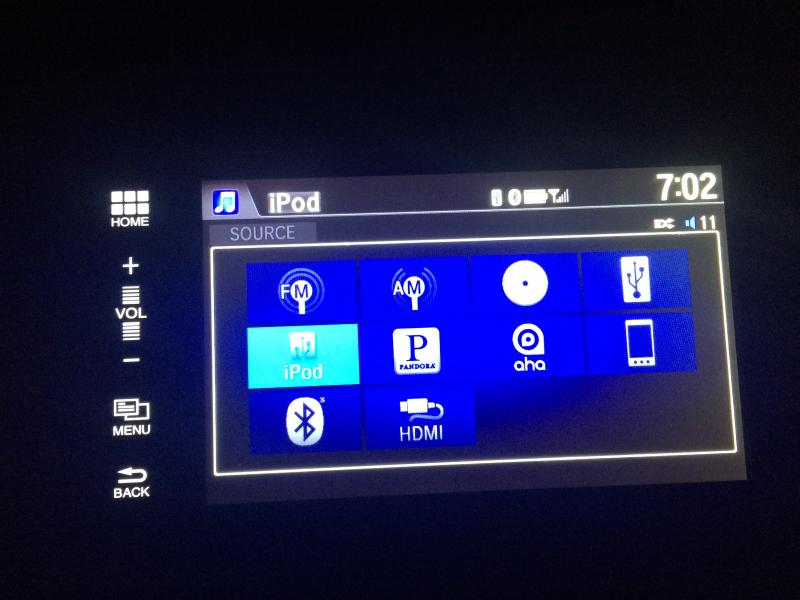
When I start driving I would like the display to automatically show the music information that goes with the iPod I have hooked up that starts playing right when I start driving. I can't get the display to show that info by default. This is the display I get by default after the driver safety warning thing goes away:

Name:  fitinfo1_zps2mru376r.jpg
Views: 2133
Size:  43.3 KB

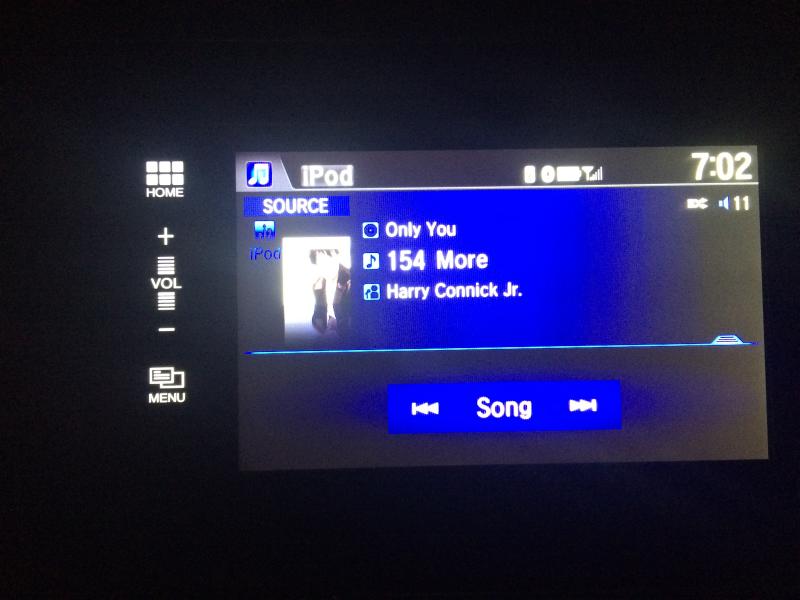
When I push the iPod icon I get the screen I want:

Name:  fitinfo2_zps6ynssupr.jpg
Views: 2084
Size:  41.1 KB

Can someone help me set it up so I automatically, by default, get the info shown in the bottom photo without pushing any buttons when I start driving?

Thanks,
Steve
 
Old Feb 5, 2015 | 06:46 AM
  #2  
MacStevenXIII's Avatar
Member
Joined: Jan 2015
Posts: 33
From: Woburn, MA
5 Year Member
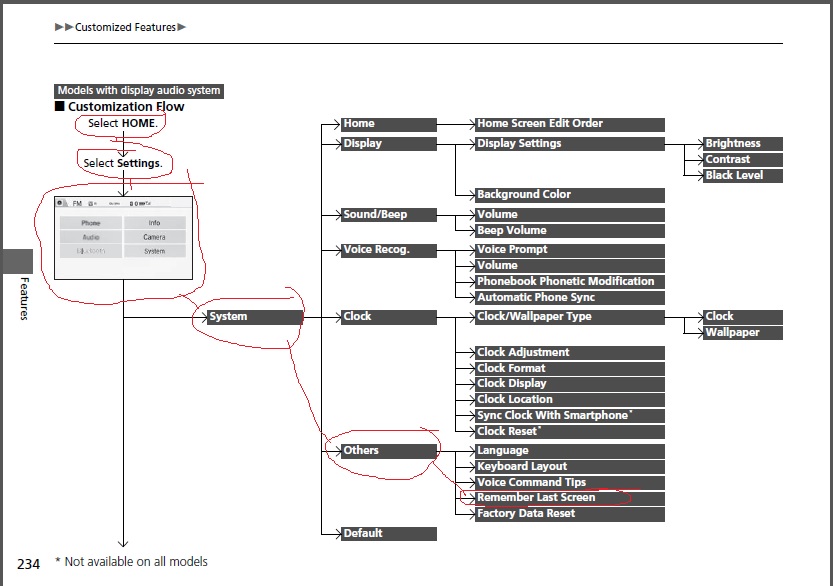
Try following these instructions to set the stereo to "Remember Last Screen";

Name:  iX7FesP.jpg
Views: 609
Size:  87.9 KB
 

Last edited by MacStevenXIII; Feb 5, 2015 at 06:48 AM.
Old Feb 5, 2015 | 07:10 PM
  #3  
SteveSatch's Avatar
Thread Starter
|
Member
Joined: Jul 2014
Posts: 76
From: Murrieta, Ca
5 Year Member
I thought "remember last screen" would fix the problem too but it doesn't. I have that selected and when I start my car I always get the screen shown in the top photo when I want the screen in the bottom photo.
 
Old Feb 6, 2015 | 07:37 AM
  #4  
GoBucky's Avatar
Member
Joined: Jan 2015
Posts: 798
From: Wisconsin
Originally Posted by SteveSatch
I thought "remember last screen" would fix the problem too but it doesn't. I have that selected and when I start my car I always get the screen shown in the top photo when I want the screen in the bottom photo.
I have the exact same issue, I set "Remember last screen" to on, but it still starts up on the screen with all the source apps displayed.
 
Old Feb 6, 2015 | 08:17 AM
  #5  
RA091424's Avatar
Banned
Joined: Feb 2015
Posts: 2
Originally Posted by GoBucky
I have the exact same issue, I set "Remember last screen" to on, but it still starts up on the screen with all the source apps displayed.
It looks as though you have the "Audio Source Pop-Up" setting turned on. With that on, you go straight to a list of all your available audio sources. Turn that off in audio settings, and keep "Remember Last Screen" turned on. Should give you what you're looking for.
 
Old Feb 6, 2015 | 09:28 AM
  #6  
SteveSatch's Avatar
Thread Starter
|
Member
Joined: Jul 2014
Posts: 76
From: Murrieta, Ca
5 Year Member
Originally Posted by lane73179
It looks as though you have the "Audio Source Pop-Up" setting turned on. With that on, you go straight to a list of all your available audio sources. Turn that off in audio settings, and keep "Remember Last Screen" turned on. Should give you what you're looking for.
Thanks. I'll try that when I go to work in a few. Hope it works!

 
Old Feb 7, 2015 | 11:37 AM
  #7  
SteveSatch's Avatar
Thread Starter
|
Member
Joined: Jul 2014
Posts: 76
From: Murrieta, Ca
5 Year Member
That worked! Thanks so much. Too many menus and sub-menus. Not very user friendly.
 
Old Mar 12, 2018 | 10:50 PM
  #8  
wmo168's Avatar
Member
Joined: Jan 2018
Posts: 68
From: South Florida
Thank you for the help... save me pressing more buttom
 
Old Feb 13, 2020 | 10:52 AM
  #9  
ascothern's Avatar
New Member
Joined: Feb 2020
Posts: 1
From: US
5 Year Member
I will say that the "Audio Source Pop Up" option turned on for me spontaneously, I'm confident of it. It just started happening one day.
 
Related Topics
Thread
Thread Starter
Forum
Replies
Last Post
carrier
3rd Generation GK Specific Fit I.C.E. Sub-Forum
17
Mar 11, 2021 02:00 PM
aderon
3rd Generation (2015+)
2
Feb 11, 2015 10:38 AM
Stife6
2nd Generation (GE 08-13)
0
Jan 6, 2015 09:54 PM
Ex-MA Hole
3rd Generation (2015+)
5
Aug 24, 2014 06:27 AM


All times are GMT -4. The time now is 10:18 AM.