


Camera help please


Camera help please
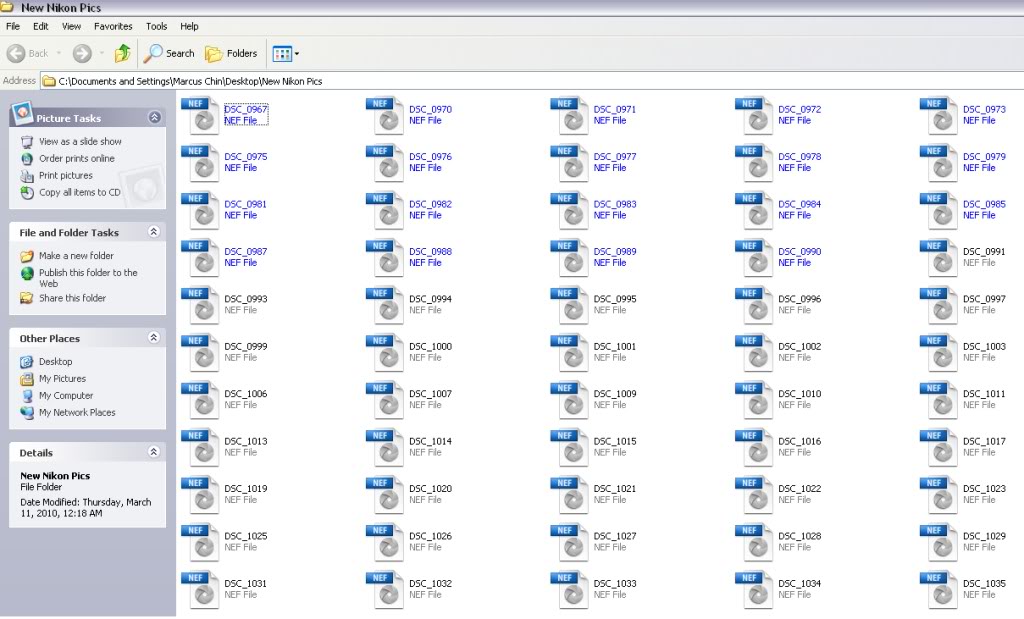
i have a D60 with a sandisc mc and I just went to upload the pictures to my computer and for some reason it wont. Normally I plug the camera via usb, then clip "open folder to view it's files" then drag and drop to my external hd, this time I couldn't. Since I couldn't use my normal route, I tried utilizing my Nikon transfer software. It would transfer them over, but when I went to view them it had like a safe with a key icon and I couldn't do anything with them. Never asked for a pw, never gave me a preview........nada! I have alternatively tried taking my MC out and use it in a card reader and that wont work  . Also, when I click on the file(s) to view them it opens my Nero. No effing clue wtf that is doing. Has anyone experienced this before, if so what was the fix?
I attached a SS so you can see wtf I am talking about
Thanks!
. Also, when I click on the file(s) to view them it opens my Nero. No effing clue wtf that is doing. Has anyone experienced this before, if so what was the fix?I attached a SS so you can see wtf I am talking about
Thanks!

why are your files in NEF? usually images are jpg.... I would to uninstall the Nikon software....
if that dose not work give this a try...
Nikon Imaging | Global Site | NEF Codec Download
if that dose not work give this a try...
Nikon Imaging | Global Site | NEF Codec Download
Looks like you're in raw format. Only certain programs can open those like the Nikon program or Adobe Photoshop. Normal windows viewer or a few other programs will not recognize that type of file. Try opening your Nikon program and loading those pics from there. Or right click the folder and open with your Nikon program. (right click< open with< choose program)

yes vinn, I am sure lol!
and I haven't changed any settings on my camera.....ever, that's why my pictures suck most of the time I use this thing like a point n shoot hahahaha
and i checked real quick on .NEF...Nero Encrypted File. I guess all the photos on my camera are stuck in the .NEF format...lost
and I haven't changed any settings on my camera.....ever, that's why my pictures suck most of the time
I use this thing like a point n shoot hahahahaand i checked real quick on .NEF...Nero Encrypted File. I guess all the photos on my camera are stuck in the .NEF format...lost

Thread
Thread Starter
Forum
Replies
Last Post
tocirahl
3rd Generation GK Specific Fit I.C.E. Sub-Forum
2
Apr 24, 2019 11:14 PM
adigitalcure
3rd Generation GK Specific Fit I.C.E. Sub-Forum
14
Dec 11, 2015 04:02 PM

